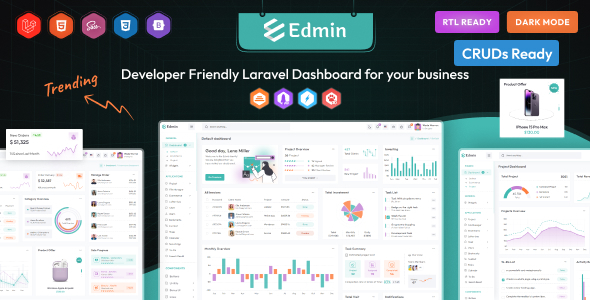
Edmin is a Laravel admin dashboard template built on Bootstrap for rapid backend UI development. It’s perfect for agencies and developers needing a custom admin panel or CMS.
Edmin: A Practical Laravel Admin Dashboard Template
This Edmin Laravel admin dashboard template is essentially a pre-built UI kit for anyone working with Laravel on the backend. It comes packed with a lot of common components you'd typically need for an admin interface, saving you from building them all from scratch.
Think of it as a starter pack for your custom admin panel, app backend, or content management system. It handles the visual heavy lifting so you can focus more on the application's core logic.
Who Benefits from this Laravel Admin Panel and Who Should Skip It
This template is for developers, freelancers, and agencies who frequently build custom admin interfaces and need to hit deadlines quickly. If you're tired of wiring up every table, form, and chart by hand for each new project, this offers a significant head start.
It's particularly useful if your clients have specific requirements for a custom backend UI but aren't looking for a completely bespoke design system. It solves the headache of setting up a functional, visually consistent admin environment from zero.
However, if you require extremely deep customization that goes far beyond Bootstrap's capabilities, or if your project demands a truly unique, pixel-perfect design that doesn't resemble a standard admin template, this might not be your best fit. Also, if you're not comfortable with Laravel or Bootstrap, the learning curve could be steeper than just building a simple interface yourself.
Layouts, Pages, and Essential Components for Backend Development
Edmin provides a couple of different dashboard layouts right out of the box, which is handy for offering clients options or for different use cases within the same application. You get a good selection of common pages like forms, views, and various UI elements.
The inclusion of data table functionality with export options (CSV, Excel, PDF, copy, print) is a real time-saver for any application dealing with large datasets. In our experience building custom Laravel admin panels, this feature alone can save hours of development and integration work.
- Includes two different dashboard layouts.
- Comes with Blade templates for common pages.
- Features a variety of forms, views, and UI kits.
- Integrated data tables with export capabilities (CSV, Excel, PDF, Copy, Print).
- Offers multiple chart options (Apex, Chartist, Chart.js) for data visualization.
- Supports light, dark, and boxed template styles.
Code Quality and Developer Experience
The template is built with Bootstrap, HTML5, CSS, jQuery, and Laravel. It uses SASS for styling, which is a standard practice and means you can easily manage and customize the CSS variables and structure. This makes changing colors, fonts, or spacing across the entire application much simpler, leading to lower maintenance costs for clients.
The code is noted as clean and well-commented, which is crucial when you're taking over a template and need to understand how things are wired up. W3C validated code is also a good sign, indicating adherence to web standards, which generally leads to better cross-browser compatibility and fewer rendering issues.
After building multiple agency sites with tools like this, clean code and SASS architecture are non-negotiables for efficient project delivery. It means less time debugging strange layout issues and more time on actual feature development.
Responsiveness and Compatibility for Diverse Devices
A fully responsive layout is standard for any web project today, and Edmin delivers on that. This ensures your admin dashboard will function and look correct across various devices, from large desktop monitors down to mobile phones. This is a critical factor for business owners, as it guarantees their team can access and manage data effectively from anywhere, on any device, improving productivity.
SEO Readiness and Semantic Structure
While an admin dashboard isn't typically a public-facing site, a clean semantic HTML structure still matters for maintainability and potential future integrations. The W3C validation points to a solid foundation. Using Google Fonts means standard font loading, which is generally GDPR-ready if implemented correctly, avoiding unnecessary third-party tracking. This attention to underlying structure contributes to a more robust and future-proof application, even if direct SEO isn't the primary concern for an internal tool.
Final Thoughts on Edmin for Your Next Laravel Project
Edmin is a solid, practical choice if you need to quickly deploy a functional Laravel admin dashboard. It won't win any awards for groundbreaking design, but it provides a comprehensive set of UI components and a well-structured codebase that can genuinely save you a significant amount of development time.
The trade-off is that you're working within a Bootstrap framework, so deep, unique visual customization will require more effort. However, for the vast majority of custom backend UI starter kit needs, this template provides excellent value and a reliable foundation. It's a smart investment for cutting down project timelines and focusing on core application features.
FAQ
Is Edmin compatible with the latest Laravel versions?Yes, the description explicitly mentions compatibility with Laravel 12, ensuring it works with recent Laravel environments.
Can I easily change the overall look and feel?Since it uses SASS and Bootstrap, you can manage styles through SASS variables for colors and typography, offering good control over the visual identity without diving deep into every CSS file.
Are there any performance considerations with this template?Like many templates with numerous components, you might find some unused assets. It's good practice to audit and remove any components or scripts you're not using to optimize for faster load times, which impacts Core Web Vitals.
Does Edmin include a user authentication system?The template provides the UI components for user management, forms, and views, but you would integrate it with Laravel's built-in authentication or a package like Laravel Breeze/Jetstream to handle the actual backend logic for user authentication.