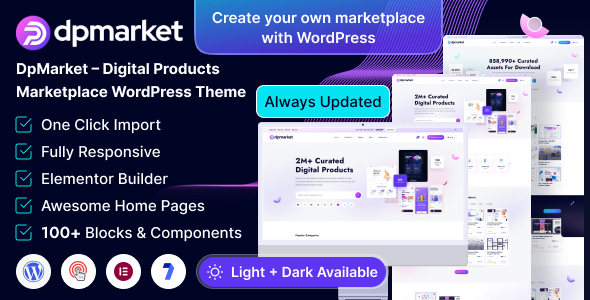
DpMarket is a WordPress theme for building digital product marketplaces, leveraging Elementor for easy customization and WooCommerce for sales functionality. It’s designed for agencies and freelancers aiming to launch multi-vendor platforms quickly.
DpMarket: A WordPress Theme for Digital Marketplaces
DpMarket presents itself as a pre-built solution for anyone looking to establish an online marketplace specifically for digital goods. Think eBooks, software licenses, graphic design assets, or music tracks. The core promise here is speed to market, using Elementor as the primary tool for visual page building. This means you can assemble pages without touching code, which is a significant time saver for certain project types.
The theme comes with a set of pre-designed pages and homepage variations. This is standard for most premium themes and allows for a quick visual starting point. The integration with WooCommerce is crucial; it handles the actual selling of products, including secure downloads, which is a key requirement for any digital marketplace. The multi-vendor aspect, allowing different sellers to list their items, is also a central feature, turning your site into a platform rather than just a single-seller store.
Who is DpMarket For and Who Should Look Elsewhere
This theme is a good fit for freelancers, small agencies, or even individuals who need to get a digital marketplace off the ground fast. If your clients have a clear vision for a multi-vendor platform selling digital items and budget is a concern, DpMarket can significantly cut down on initial development time. It’s also suitable if you're building a niche marketplace and want a ready-made structure rather than starting from scratch.
However, if you’re building a highly custom application with complex backend logic, unique user roles beyond simple vendor/customer, or require deep integration with third-party systems that aren't standard WooCommerce extensions, this theme might not be the best choice. It's built for a specific use case, and trying to force it into very different requirements could become more challenging than building custom from the ground up. Also, developers who prefer to build everything from scratch with minimal theme influence might find the framework restrictive.
Solving the Digital Marketplace Launch Headache
The main problem DpMarket solves is the sheer complexity and time investment required to build a functional digital marketplace from scratch. Setting up user roles, vendor dashboards, product upload systems, secure download handling, and payment gateway integrations is a significant undertaking. By providing these features out-of-the-box, DpMarket aims to reduce the development hours needed for these core functionalities, allowing you to focus on design customization and marketing.
For instance, setting up a secure download system for digital products can be tricky. This theme, by integrating with WooCommerce and likely using its extensions, handles that aspect. This saves you from researching and implementing secure file handling, which is a critical part of selling digital goods online. The one-click demo import is another practical benefit, giving you a visually complete site to then tweak, rather than starting with a blank canvas.
Layouts, Pages, and Core Components
DpMarket includes over 20 inner pages and multiple homepage layouts, which is fairly standard for themes in this category. This variety allows for different presentation styles for products, categories, and vendor profiles. The inclusion of custom Elementor widgets is a practical touch, providing pre-built modules specifically designed for marketplace features, like vendor listings or product grids tailored for digital items.
The theme is built on Bootstrap, a widely used framework. This means the underlying structure is familiar to many developers and generally leads to predictable responsive behavior. The CSS organization, while not explicitly detailed, is likely structured to work with Elementor's styling capabilities. The mobile menu behavior, for example, is a small but important detail; a clunky mobile menu can frustrate users and impact conversions.
eCommerce and Multi-Vendor Functionality
The core strength of DpMarket lies in its WooCommerce integration and multi-vendor capabilities. This isn't just about selling products; it's about creating an ecosystem. The theme likely provides vendor dashboards where sellers can manage their products, view sales, and handle orders. This is the engine that drives a true marketplace.
The advanced search and filtering options are also vital for a digital marketplace where users might be looking for very specific types of assets. A well-implemented filtering system can dramatically improve user experience and conversion rates, helping customers find exactly what they need among potentially thousands of listings. This is a key element for any successful ecommerce website template.
Code Quality and Developer Experience
The theme mentions being built with SASS and Bootstrap, which are good indicators of a structured development approach. While the description doesn't go into deep technical detail, themes that are "developer-friendly" and have "well-structured and commented code" usually mean less time spent deciphering the theme's internals when customization is needed. This translates to lower maintenance costs for clients down the line.
The inclusion of SCSS files suggests that the theme's styles are organized in a way that’s easier to manage and extend than plain CSS. This is beneficial if you need to make significant style changes or integrate custom CSS that won't conflict with the theme's existing styles. The promise of clean code and detailed documentation is standard, but its actual implementation can vary greatly.
Responsiveness and Browser Compatibility
The theme is described as fully responsive and supporting modern devices. This is a baseline expectation for any WordPress theme today. When tested on a demo site, the layout should adapt smoothly across different screen sizes, from large desktops down to small mobile phones. This ensures a consistent experience for all users, regardless of their device, which is critical for user engagement and conversion.
Support for all modern browsers is also a standard feature. This means you can expect the marketplace to function correctly in Chrome, Firefox, Safari, and Edge, which is essential for reaching a broad audience. The practical benefit is avoiding support tickets related to browser-specific display issues.
SEO Readiness
The claim of being "SEO Optimized" is common, but what matters is the underlying structure. A theme that uses clean, semantic HTML and avoids unnecessary bloat contributes to better search engine performance. This means the structure of pages and posts is logical, making it easier for search engines to crawl and understand your content. This is important for any agency needing fast turnarounds on SEO-ready sites.
Themes that load assets efficiently and don't rely on excessive JavaScript for basic layout functions are generally better for Core Web Vitals, which impacts search rankings. While the description doesn't detail asset loading strategies, a well-built theme should prioritize performance.
A Practical Take on DpMarket
DpMarket offers a focused approach to building digital product marketplaces. It leverages Elementor and WooCommerce effectively to provide a functional foundation. While it’s not a revolutionary product, it does what it sets out to do: provide a quicker path to launching a multi-vendor digital goods platform. The trade-off is that you're working within the confines of a pre-built theme and a page builder, which is standard for this type of product. If you need to launch a digital marketplace without extensive custom coding, this theme can save you significant time and effort.
FAQ
Is DpMarket suitable for selling physical products as well?
While DpMarket is designed primarily for digital products, its WooCommerce integration means it can technically handle physical products. However, its specific features and layouts are optimized for digital goods, so you might need significant customization for a physical product store.
How easy is it to add custom vendor features beyond what's included?
Adding custom vendor features would depend on your development skills and the theme's underlying structure. If you need features not covered by standard WooCommerce extensions or the theme's built-in options, you'll likely need custom coding.
What kind of performance can I expect for a busy marketplace?
Performance will largely depend on your hosting, the number of plugins you install, and how you optimize your content. While the theme aims for clean code, a busy marketplace with many vendors and products will require ongoing optimization to maintain good loading speeds.