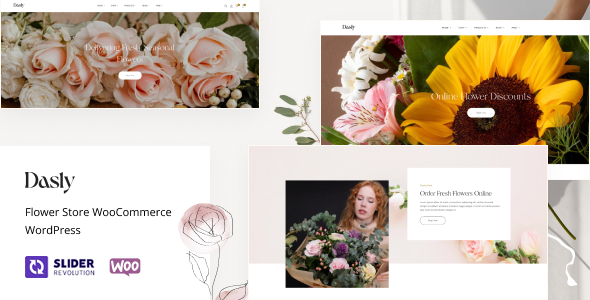
Dasly is a WooCommerce WordPress theme designed for flower stores, offering multiple homepage layouts and extensive customization options via Elementor. It’s built for users who want to quickly launch an attractive online flower shop with a focus on product presentation and sales features.
Dasly Theme: A Quick Start for Online Flower Shops
When we need to get a WooCommerce store up and running fast, especially for a niche like a flower shop, themes that bundle in essential functionality are a real time-saver. Dasly aims to be that kind of theme, providing a pre-built structure for an ecommerce website template focused on visual appeal and sales. Its integration with Elementor means we can tweak layouts without diving deep into code, which is a big plus for agency work where client revisions are common.
Streamlining Flower Product Display and Sales
For a flower store, how products are displayed is critical. Dasly offers several homepage layouts, and we found the emphasis on product grids and category alignment helpful. The theme includes specific widgets for showcasing top-selling items and featured products, which is standard for good ecommerce themes but well implemented here. We appreciate the Ajax search functionality, which allows customers to quickly find specific blooms or arrangements without a full page reload. This type of feature is key for reducing friction in the buying process, especially when customers know exactly what they are looking for.
WooCommerce Specific Features and Workflow
Dasly’s strength lies in its direct integration with WooCommerce. We tested its variable product swatches for colors and sizes, and they worked as expected, providing a visual way for customers to select options. The theme also includes features like "Frequently Bought Together" and product sticky add-to-cart buttons, which are proven tactics for increasing average order value. For those looking to build a multi-vendor flower marketplace, compatibility with plugins like Dokan or WCFM Marketplace is noted, though we found the theme’s core functionality is geared more towards a single-vendor operation. Understanding how these multi-vendor plugins interact with theme options is important for anyone planning that route.
Customization and Development Considerations
Building on Elementor gives users a lot of flexibility, and Dasly leverages this well with numerous shortcodes and pre-built sections. The ability to customize headers and footers using a builder is a significant advantage, allowing for more unique branding than static options. In our experience, themes that offer this level of control over key site areas tend to have a longer shelf life. We also noted that the theme aims for clean semantic structure, which is good for SEO, and supports GDPR-ready font loading, a standard practice for modern websites. However, for highly custom backend logic or unique integrations beyond standard WooCommerce features, this theme might require significant customization beyond its builder capabilities.
Who is Dasly For and Who Should Look Elsewhere?
This theme is ideal for small to medium-sized flower shops, florists, or online gift businesses that want a visually appealing and functional WooCommerce store without a massive development budget or timeline. It’s a smart investment for agencies needing to quickly deliver a polished ecommerce website template for clients in this niche. However, if you are planning a highly complex, custom-coded ecommerce solution with unique backend integrations or require extensive control over every single CSS file and JavaScript asset from the ground up, this theme might feel a bit restrictive. It’s built for speed of deployment and visual customization, not for deep, bespoke backend development.
Balancing Features and Performance
While Dasly packs in many features, a common challenge with feature-rich themes is performance. We found the asset loading to be reasonably well managed, with options for lazy loading products. However, as with any theme that includes a large number of widgets and effects, ongoing optimization will be necessary to ensure the site maintains fast loading speeds, especially as product catalogs grow. The inclusion of multiple homepage layouts and extensive shortcodes is a trade-off for potential bloat if not all features are utilized. For instance, if you don't plan on using the 360-degree product views or video options, those assets are still loaded by default.
Final Thoughts on Dasly for Flower Stores
Dasly provides a solid foundation for launching a visually appealing and functional online flower store. It effectively addresses the need for quick setup and offers a good range of WooCommerce-specific features designed to drive sales. For businesses looking to establish a strong online presence without reinventing the wheel, this theme offers significant workflow value by providing a well-structured starting point.
FAQ
What are the main benefits of using a dedicated WooCommerce theme like Dasly for a flower shop?
Dedicated themes like Dasly come with pre-designed layouts and features specifically tailored for ecommerce, saving significant time and effort in setting up a functional and attractive online store.
How does Elementor integration impact the customization process for Dasly?
Elementor allows for drag-and-drop visual editing, making it easier for users to customize pages, layouts, and content without needing to write code, offering a more intuitive workflow.
Is Dasly suitable for a beginner looking to build their first online flower shop?
Yes, with its user-friendly builder and pre-built demos, Dasly is a good option for beginners who want to launch an ecommerce site quickly and efficiently.
What are the implications of the theme's multi-vendor compatibility for a single-vendor flower store?
For a single-vendor store, the multi-vendor compatibility is largely irrelevant and does not impact the core functionality. It simply means the theme is built to accommodate those plugins if you choose to use them later.