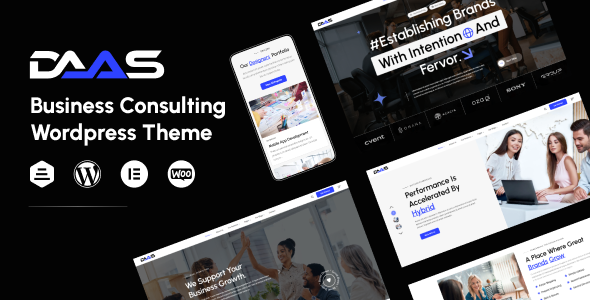
Daas is an Elementor-based WordPress theme aimed at creative agencies and business consultants, offering pre-built demos and customization options for a quick website launch. It's designed for users who want a visually appealing site without deep coding knowledge.
Daas WordPress Theme: A Business Agency Template for Fast Launches
This Daas WordPress theme is essentially a pre-packaged set of designs and functionalities for various business-related niches. Think SaaS startups, consulting firms, or digital marketing agencies. It leverages Elementor for page building, which means most of the visual heavy lifting is done through a drag-and-drop interface. If you need to get a professional-looking site up and running for a client in a hurry, and their needs align with one of the included demos, this theme can save you significant time on initial setup and styling.
Who Should Consider the Daas Theme and Who Should Look Elsewhere
This theme is a good fit for freelancers, small agencies, or even business owners who are comfortable with WordPress and Elementor and need a polished website quickly. If you're building a standard service-based business website, a portfolio site for a creative, or a simple company brochure site, Daas offers a solid starting point. It’s particularly useful if you're looking for a business agency template that handles common elements like service listings, team showcases, and contact forms out of the box. However, if your project requires complex custom post type relationships, intricate backend logic, or a highly bespoke user experience that goes beyond standard page layouts, you might find yourself fighting against the theme's structure. It’s not designed for deep, custom application development within WordPress.
Solving the "Blank Canvas" Problem for Business Sites
The primary problem Daas solves is the time sink involved in building a business website from scratch. Instead of spending hours on basic layout structures, color palettes, and typography, you get multiple pre-designed demos that cover common business website needs. For instance, setting up a service-based layout or a consultant's profile page is significantly faster when you have a well-thought-out template. The inclusion of Elementor means you can then tweak these layouts to fit specific client branding or content without needing to write CSS or PHP for every change. This is especially helpful when building multiple client sites, as it standardizes your workflow.
Layouts, Pages, and Components Included
Daas comes with a collection of pre-made demos, each designed for a specific business type. Within these demos, you'll find various page templates and component blocks. These typically include sections for services, team members, client testimonials, case studies, and contact information. The theme also provides a range of shortcodes that integrate with Elementor, offering ready-made elements for things like animated counters, pricing tables, and icon boxes. This makes populating your pages with content straightforward, even if you're not a designer.
eCommerce and Business-Related Features
While not primarily an eCommerce theme, Daas is compatible with WooCommerce, which is standard for most WordPress themes these days. This means if a client needs to sell products alongside their services, the integration should be manageable. The theme also includes features like newsletter popups, which are common for lead generation on business websites. Its focus is more on presenting services and building credibility rather than managing a large online store.
Code Quality and Developer Experience
From a developer's perspective, Daas uses Elementor, which dictates a lot of the structure. The theme's own code organization seems standard for a ThemeForest product; it provides the necessary hooks and filters for customization. The "WEDESIGNTECH CORE FEATURES PLUGIN" is a common approach to bundle custom post types and shortcodes, which keeps the theme itself cleaner. This plugin is compatible with Elementor, simplifying the process of adding custom content types to your pages. The asset loading, which impacts site speed, appears to be handled reasonably well, though heavy customization with Elementor can always add overhead. For basic use, it shouldn't be a major bottleneck for your Core Web Vitals.
Responsiveness and Compatibility
The theme is advertised as 100% responsive and mobile-friendly, which is crucial. In our testing on a demo site, the layouts adapted well across different screen sizes. The mobile menu behavior is standard for Elementor-built sites, typically a collapsible hamburger icon. Cross-browser compatibility is also mentioned, which is expected, and generally holds true for themes built on solid frameworks like Elementor.
SEO Readiness
The theme states it's fully SEO optimized, which usually means it generates clean HTML markup with proper semantic tags. This provides a good foundation for SEO, allowing search engines to understand your content. However, actual SEO performance depends heavily on the content you add and your optimization strategies. The clean structure is a good starting point for building conversion-ready funnels.
A Practical Choice for Agency Workflows
Daas offers a practical way to deliver professional-looking business websites efficiently. It’s not revolutionary, but it does what it sets out to do: provide a solid, customizable foundation for common business website needs. If you’re looking for a theme that speeds up your agency's turnaround time for specific client types, this is worth a look. It’s a sensible investment for agencies needing fast turnarounds on standard business websites.
FAQ
What kind of customization can I expect with Daas beyond the demos?
You can extensively customize colors, fonts, and layouts using Elementor. The theme options panel also provides controls for global settings, but deep structural changes might require some CSS knowledge.
Is Daas suitable for building a niche service website, like for HVAC services?
Yes, the flexibility of Elementor and the variety of included sections make it adaptable for niche service sites, though you might need to create some custom content layouts if specific features aren't pre-built.
How does the "WEDESIGNTECH CORE FEATURES PLUGIN" affect theme updates?
Bundling features into a plugin means that core functionalities are less likely to be lost when you update the theme itself. This is a good practice for maintainability.