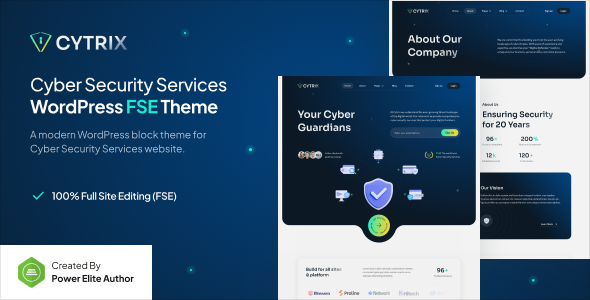
Cytrix is a WordPress Full Site Editing theme for cyber security and IT service companies. Get block editor power with Gutenverse for fast, niche-specific site launches.
Cytrix: A Full Site Editing Theme for Cyber Security Websites
This theme is built around WordPress's native Full Site Editing (FSE) capabilities, extended by the Gutenverse plugin. You're building your entire site—headers, footers, page layouts—directly within the WordPress block editor. This workflow aims for granular control without custom code.
This approach provides a solid foundation for a professional online presence, particularly for cyber security services and IT protection. It offers a structured way to present services and build trust, crucial in this industry.
Who Benefits from this Full Site Editing Theme for IT Companies?
Cytrix is a strong candidate for agencies and freelancers needing to deliver professional cyber security websites or IT service company sites on a tight schedule. If your workflow already uses the native WordPress block editor, this theme offers a focused path. Templates and block patterns can significantly cut down initial setup time.
However, if you're a developer who prefers to hand-code every aspect, or require deep, custom backend logic beyond WordPress core and Gutenverse, this might not be your ideal fit. It's designed for efficiency within the block editor ecosystem.
Design Approach and Niche Focus for Security Websites
The design language of Cytrix is what you’d expect for a cyber security theme: clean, professional, and focused on clarity. It prioritizes readability and clear calls to action, vital for communicating complex security concepts.
When we tested the kit on a demo site, the visual elements felt appropriate. Global FSE styles make consistent color and typography changes straightforward, helping maintain a cohesive brand image for data protection and network security businesses.
Layouts, Pages, and Gutenverse Blocks for Security Websites
Cytrix comes with pre-built templates for common pages like home, services, about, and contact. These are pre-arranged block patterns you can load and customize. It also includes specific templates for headers, footers, and post archives, standard for FSE themes.
Gutenverse integration is key here. It extends the native block editor with additional blocks and layout options. This means more design flexibility for things like advanced hero sections or service showcases, without needing multiple separate block plugins.
Code Quality and Developer Experience with Block Editor Themes
In our experience with similar frameworks, FSE themes generally produce cleaner HTML output compared to many older page builder themes. Cytrix leverages this by building directly with WordPress blocks. The CSS is handled by WordPress's own block styles and the Gutenverse plugin, typically meaning a more modular approach to styling. This is good for long-term maintenance.
This architecture contributes to better Core Web Vitals. Less extraneous CSS and JavaScript mean faster loading times, benefiting user experience and search engine rankings. Block-based styling offers organizational benefits.
Responsiveness and Technical SEO Readiness
The theme is built with responsiveness in mind, standard for any modern WordPress theme. It adapts well across devices, ensuring your cyber security website looks good and functions correctly for all visitors. This is a fundamental requirement for user experience and SEO.
For technical SEO, Cytrix provides a clean semantic structure, which search engines appreciate. The FSE approach encourages proper heading hierarchy and content organization, foundational for good on-page SEO. It also plays nicely with popular SEO plugins for effective meta data management.
Final Verdict on Cytrix for Cyber Security Services
Cytrix offers a focused, efficient way to build a professional WordPress theme for cyber security services. If you're comfortable with the block editor and appreciate Gutenverse's extended capabilities, this theme can genuinely save significant development time. It provides a solid, performance-oriented foundation aligning with modern WordPress development.
While Gutenverse reliance means you're tied into that ecosystem for some advanced blocks, the overall package delivers a robust solution for this specific niche. For agencies and freelancers needing to quickly launch well-structured, performant sites for IT companies, investing in Cytrix makes practical sense. It streamlines the build process and helps ensure a consistent, trustworthy online presence.
FAQ
Is Cytrix genuinely optimized for speed, or is that marketing hype?Cytrix, as an FSE theme leveraging the block editor, inherently benefits from a leaner codebase compared to many older, heavier themes. This architecture generally leads to better performance and faster loading times in our experience.
How easy is it to customize the layouts without coding knowledge?Customization is done entirely within the WordPress block editor and Gutenverse interface. If you're comfortable with drag-and-drop block editing, you can make extensive layout and style changes without writing any code.
What happens if I decide not to use the Gutenverse plugin later?While the core FSE theme would still function, any layouts or blocks specifically provided by Gutenverse would no longer work as intended, potentially breaking parts of your design. The theme's full potential relies on Gutenverse.