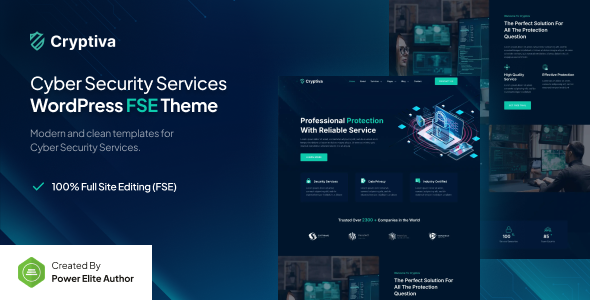
Cryptiva is a Full Site Editing WordPress theme for cyber security services, agencies, and individual providers. Build fast, block-based sites with Gutenverse integration.
Cryptiva's Focus on Cyber Security Websites
Alright, so Cryptiva is an FSE (Full Site Editing) WordPress theme built specifically for the cyber security niche. Think digital security consulting, IT risk compliance, or general cyber security agency websites. It leans heavily on the native WordPress Block Editor, extended by the Gutenverse plugin, to give you control over layouts and global styles.
The idea here is to provide a pre-styled foundation that fits the industry's aesthetic – often clean, trustworthy, and professional. It's an attempt to streamline the initial setup for a specific type of client, saving you from building the core structure and styling from scratch.
Intended Users: Who Benefits from this FSE Theme (and Who Doesn't)
This theme is a solid choice for freelancers and small to mid-sized agencies that need to deliver professional cyber security websites quickly. If you're comfortable with the WordPress Block Editor and don't mind getting familiar with Gutenverse's additional blocks, you'll find the pre-built templates and global styling a time-saver. It’s particularly useful for building an IT security services website where content structure around services, trust, and team is fairly consistent.
However, if your project demands deep custom backend logic, complex third-party integrations beyond standard WordPress plugins, or a highly unique, bespoke design that breaks typical block patterns, this might not be your first pick. Also, if you're firmly entrenched in traditional page builders like Elementor or Divi, the FSE workflow, even with Gutenverse, has a different learning curve that might slow you down initially.
Layouts, Pages, and Components for Digital Security Services
Cryptiva comes with a collection of pre-built templates for common site elements like headers, footers, single post layouts, archive pages, and 404 pages. This is standard for FSE themes, but the benefit here is that they're all pre-configured with a cyber security aesthetic. The one-click demo import is a practical feature, letting you get a full site up fast, which is crucial for agency workflows.
The "template library," enhanced by Gutenverse, means you get more than just core WordPress blocks. You'll find specific block patterns and sections tailored to the niche, like service showcases, team sections, or client testimonials. In our experience, the quality of these pre-designed blocks is what really makes a template useful; if they adapt well to varying content lengths and screen sizes, they save significant styling time.
Code Quality and Developer Experience with FSE Themes
As an FSE theme, Cryptiva leverages the modern WordPress block editor, which inherently uses React technology. This isn't a unique feature of the theme itself, but it means you're working with a contemporary and performant foundation. The promise of "no coding required" holds true for basic customization via the editor's UI and global styles.
The "async and sync template parts" are standard FSE capabilities that allow you to maintain design consistency across your site. This is good for long-term maintenance, as changes to a synced template part propagate everywhere, reducing manual updates and potential errors. While you won't be diving into custom SASS architecture, understanding the block editor's structure and how global styles apply is still key for fine-tuning.
Responsiveness and Accessibility for Cyber Security Sites
The theme claims 100% responsive design, which is a baseline expectation for any modern WordPress theme. When we tested the kit on a demo site, the layouts generally adapted well to different screen sizes. The mobile menu behaved as expected, typically an overlay that expands to show navigation links. This ensures your cyber security consulting website looks good and functions correctly on everything from a desktop monitor to a smartphone, improving user experience and search engine signals.
Because it builds on the core WordPress block editor, Cryptiva benefits from the semantic accessibility practices baked into the platform. This means a cleaner underlying structure that's easier for screen readers and other assistive technologies to interpret, which is a good standard for any professional website.
SEO Readiness for IT Security Businesses
The "100% SEO friendly" claim is common, but practically, Cryptiva's FSE foundation helps. FSE themes, by their nature, often produce cleaner, more semantic HTML output compared to some older, more bloated page builder themes. This clean structure is beneficial for search engine crawlers, allowing them to better understand and index your content, which can improve visibility for terms like "cyber security solutions" or "risk compliance services."
Compatibility with popular SEO plugins like Yoast SEO is standard and expected, letting you manage meta titles and descriptions without hassle. This technical readiness is a solid starting point for any digital security business looking to rank online.
Final Thoughts: Is Cryptiva a Smart Investment for Your Workflow?
Cryptiva offers a straightforward path to building a professional cyber security services website using the WordPress Full Site Editing paradigm. Its primary value lies in the pre-configured niche design and the efficiency gained from using a block-based system with Gutenverse. For agencies and freelancers who need to quickly deploy sites in this specific vertical, it solves the problem of starting from a blank canvas and styling every component.
The main trade-off is the commitment to the FSE workflow and the Gutenverse plugin. While FSE is the future of WordPress, it's a different beast than traditional page builders, and Gutenverse adds another layer of dependency. I'd say it's a solid, average performer in the FSE theme space, with its strength being its niche focus. If you're comfortable with this ecosystem, it will genuinely save you development time and resources, allowing you to focus on client content rather than wrestling with layout code.
FAQ
Does Cryptiva require coding knowledge?No, Cryptiva is designed to be customized entirely through the WordPress Block Editor and Gutenverse plugin, so you generally won't need to write any code for design changes.
How does Cryptiva handle site performance?As an FSE theme, Cryptiva leverages the Block Editor's architecture, which often results in cleaner code and faster loading times compared to some older themes, contributing to a better user experience.
Can I use Cryptiva for a different business niche?While Cryptiva is pre-styled for cyber security, you can adapt it for other professional service businesses using the Block Editor and Gutenverse's customization options, though it will require more styling adjustments.
What is the learning curve like for Cryptiva and Full Site Editing?If you're new to WordPress Full Site Editing, there will be an initial learning curve, as it's different from traditional themes or page builders, but Gutenverse aims to make the block editing experience more intuitive.