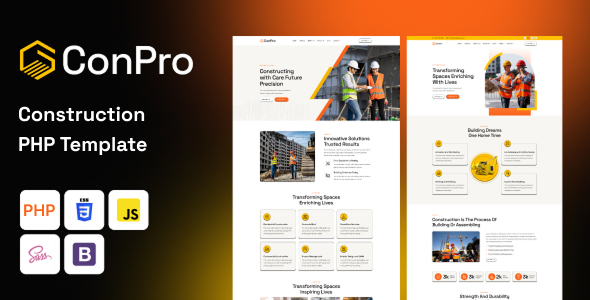
The Conpro Construction PHP Template is a straightforward HTML/CSS/PHP starter kit aimed at developers or agencies building quick brochure sites for construction or related service businesses.
What Workflow Problems Does This Construction Website Template Solve?
This template is designed to cut down initial development time for service-based websites, specifically for the construction niche. It solves the headache of setting up common layouts like service listings, project portfolios, and team pages from scratch. For agencies needing fast turnarounds on client projects, using a pre-built structure like this can save significant hours on front-end styling and basic page assembly.
In our experience building multiple agency sites, the biggest time sink is often the repetitive setup of common components. This construction service website template provides a solid foundation, allowing developers to jump straight into content population and client-specific customizations rather than wrestling with initial layout decisions.
Examining the Technical Standards and Features of Conpro
Conpro uses a standard Bootstrap framework, which means anyone familiar with Bootstrap will pick it up quickly. The inclusion of SASS for CSS styling is a welcome detail, providing a more organized and maintainable stylesheet architecture compared to raw CSS files found in many market-average templates. This helps keep maintenance costs lower in the long run.
The PHP files are primarily used for includes—think shared headers, footers, and navigation. This isn't a full-blown backend system, but it's effective for managing common elements across static pages, improving consistency and making global changes easier. For a business owner, this means updates to the navigation or footer can be done once and applied everywhere, rather than editing every single page.
- The SASS structure is logical, making it easier to find and modify styles without digging through monolithic CSS files.
- It integrates common libraries like jQuery, OWL Carousel, and Swiper for sliders and galleries, which are industry standards.
- The template adheres to W3C validation standards for HTML, suggesting a clean semantic structure that's good for SEO and basic accessibility.
- Asset loading feels standard for this type of template; nothing particularly optimized or bloated, which is a good sign for potential Core Web Vitals performance.
- The mobile menu behavior is what you'd expect from a Bootstrap-based template—a clean toggle that works well across devices, ensuring a consistent mobile experience.
Strengths and Practical Impressions of this Building Company Website Starter Kit
What impresses most about Conpro is its focus. Unlike many multi-purpose themes bloated with features you'll never use, this template sticks to the core needs of a construction business. The layouts for services, projects, and contact pages are practical and well-structured, providing a clear path for presenting company information.
The responsiveness is solid, as expected from a Bootstrap base, ensuring the site looks good on various screen sizes. When we tested the kit on a demo site, the file organization was intuitive, making it relatively simple to locate relevant sections for content changes or custom styling. This directness makes it a strong candidate for developers looking for a ready-to-go construction service website template.
Who Should Use This PHP Template for Small Contractors?
This template is ideal for freelance developers, small agencies, or even ambitious small business owners who are comfortable with HTML, CSS, and basic PHP includes. It's particularly well-suited for building static or semi-static websites for local construction companies, plumbers, electricians, or general contractors who need a professional online presence without the overhead of a content management system. If you're looking for a simple, fast deployment for a small contractor's online presence, this building company website starter kit fits the bill.
This product is not for those needing deep custom backend logic, extensive content management features, or integration with complex third-party APIs beyond basic forms.
Limitations of the Conpro Construction Template
While the template is functional, the "animations" mentioned are fairly standard and don't offer anything particularly groundbreaking. They are what you'd expect from a basic JavaScript library, not a custom-crafted experience. The primary limitation, as with any static PHP template, is the lack of a proper CMS. While the PHP includes help, managing a large amount of dynamic content or complex user interactions would quickly become cumbersome.
For extensive content, you'd eventually need to integrate a backend or migrate to a CMS, which means this template serves best as a front-end starting point rather than a long-term, scalable solution for content-heavy sites.
Final Thoughts: Is it worth it?
If you're a developer or agency tasked with building a no-frills, professional website for a construction-related business on a tight deadline, the Conpro Construction PHP Template offers a genuinely useful head start. It provides a clean, well-structured foundation that can save significant development time on front-end setup. For its intended purpose—a straightforward, responsive site for a service-based company—it delivers a practical and efficient starting point, making it a logical choice to save both time and money.
FAQ
Can I easily change the primary brand colors throughout the template?Yes, since the template uses SASS, you can typically find and update primary color variables in a central SASS file, which will then propagate changes across the entire stylesheet.
Is this template suitable for an e-commerce store for construction supplies?No, this is a brochure-style template without any e-commerce functionality or backend logic for products, carts, or payments. It's designed for showcasing services and projects.
How difficult is it to add new pages with custom layouts?Adding new pages is straightforward HTML work. For custom layouts, you'd use the existing Bootstrap grid system and components, which is manageable for anyone with front-end development experience.