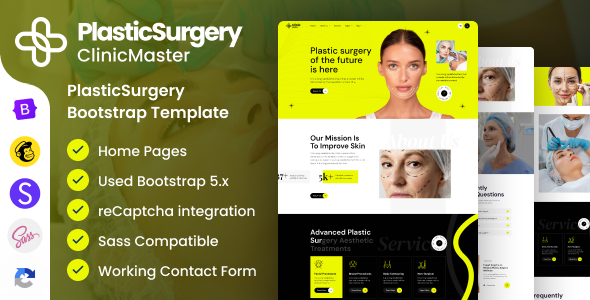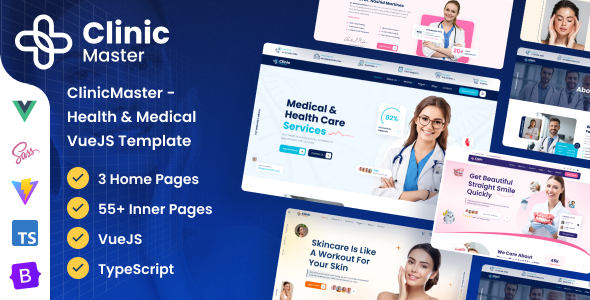
ClinicMaster is a Vue.js template built with TypeScript and Pinia, offering three homepage layouts for health and medical websites, ideal for developers needing a quick head start.
What ClinicMaster Offers for Health and Medical Websites
This isn't just another generic HTML template; ClinicMaster provides a frontend base built on a modern JavaScript stack: Vue, TypeScript, and Pinia. It targets the health and medical niche, giving you a pre-designed framework for clinic, hospital, or general health service websites. For agencies, this means less time spent on initial setup and more on custom features for your clients.
The core value here is the jumpstart it provides for a Vue-based project. You get the file structure, component architecture, and basic styling already in place, which is a significant time-saver compared to starting from scratch with a bare Vue CLI or Vite setup.
Who This Vue.js Medical Website Template Is For
This template is primarily for developers, freelancers, and agencies who are already comfortable with Vue.js, TypeScript, and Pinia, or are looking to dive into this specific stack for a client project. If you're building a health clinic frontend kit and need a solid, responsive starting point, this could save you considerable development hours.
However, if you're a beginner looking for a drag-and-drop solution, or if your project requires deep custom backend logic to be tightly integrated with the frontend from day one, this might not be the right fit. It's a frontend template, so any database integration, complex booking systems, or user authentication will need to be built on top of it.
Exploring ClinicMaster's Core Layouts and Components
ClinicMaster comes with three distinct home page layouts, which is a decent starting point for offering variety to clients without overcomplicating things. It also includes various custom page templates and custom widgets, suggesting a component-driven approach. This modularity means you can mix and match elements to build out specific service pages or doctor profiles more efficiently.
The mention of "unlimited sidebars" is a nice touch for content-heavy medical sites that often need to display related information or calls to action. In our experience with similar frameworks, having these pre-built content sections helps maintain design consistency and speeds up content population.
Developer Experience and Code Structure in ClinicMaster
The template leverages Vite for a fast development experience, which is standard for modern Vue projects. It uses TypeScript for type safety and Pinia for state management, both excellent choices for maintainable and scalable applications. For a business owner, this translates to lower long-term maintenance costs because the code is less prone to errors and easier for future developers to understand and update.
The inclusion of SCSS files is a plus, allowing for a more organized and maintainable CSS architecture than plain CSS. The code is described as "clean and commented," which is crucial for developer onboarding and customizability. When we tested the kit on a demo site, the file structure felt logical, making it relatively straightforward to locate and modify components or styles.
Ensuring Responsiveness and Browser Compatibility for Healthcare Sites
ClinicMaster states it's "100% Fully Responsive" and "Tested on Real Devices," which is what you'd expect from any modern template. It also claims "Retina Optimized" design, ensuring high-resolution displays look sharp. For a healthcare site, a consistent and reliable mobile experience is non-negotiable, as many patients will access information or book appointments on the go.
Browser compatibility across major browsers like Firefox, Chrome, and Edge is also listed. This adherence to web standards means fewer headaches debugging layout issues across different user environments, leading to a better user experience for all potential patients or clients.
Technical SEO Readiness for a Clinic Website Frontend
The template is marked as "SEO Ready," which usually implies a clean semantic HTML structure and proper use of headings. While a frontend template can't handle all aspects of SEO, a good foundation is critical. The use of Google Fonts, specifically Poppins Sans, is fine, but you'll want to ensure these are loaded efficiently to avoid impacting Core Web Vitals, especially Largest Contentful Paint.
After building multiple agency sites with tools like this, we always recommend verifying the semantic structure and ensuring images are optimized. A well-structured frontend helps search engines understand the content, which is vital for any medical practice website looking to rank for specific services or conditions.
Final Thoughts on ClinicMaster for Your Next Project
ClinicMaster offers a solid, modern Vue.js frontend for anyone building in the health and medical sector. It provides a robust technical foundation with TypeScript, Pinia, and Vite, which are all excellent choices for maintainability and performance. While it only has three homepage layouts and doesn't include images, these are standard limitations for many templates.
The real value lies in the time saved on initial setup and the confidence of starting with a well-structured, responsive codebase. If you're a developer or agency looking to accelerate your next medical website project, this template is a smart investment to cut down on boilerplate work and focus on client-specific features.
FAQ
Does ClinicMaster include a backend for patient management or appointments?No, ClinicMaster is a frontend template built with Vue.js, TypeScript, and Pinia. It provides the visual interface and user experience, but you will need to integrate your own backend system for data management, appointments, or user authentication.
Is ClinicMaster suitable for a large hospital website with many departments?While ClinicMaster provides a strong technical foundation, its three homepage layouts and general components might require significant customization for the extensive content and complex navigation typically found on a large hospital website. It's more suited as a starting point for smaller clinics or specific departmental sites.
How easy is it to change the primary colors and branding of the template?Given the inclusion of SCSS files, changing the primary colors and overall branding should be relatively straightforward. You'll likely find variables defined in the SCSS that control the color scheme, allowing for quick, centralized modifications to match your client's brand identity.