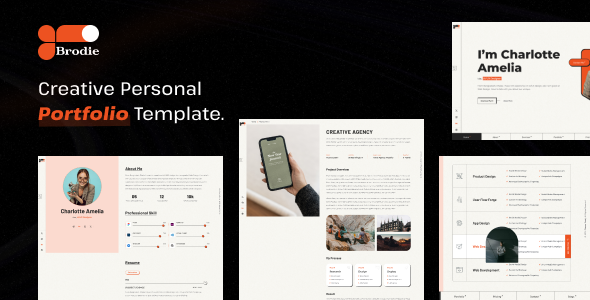
Brodie is a static HTML template for personal portfolios, ideal for freelancers, designers, and developers needing a quick online presence to showcase work effectively.
Brodie: A Static HTML Template for Creative Portfolios
This isn't a WordPress theme or a full-blown CMS. Brodie is a straightforward HTML template, built with HTML5, CSS3, JavaScript, Bootstrap, and jQuery. It provides a set of pre-designed pages to get a static website up and running quickly. For anyone needing to present their work online without the overhead of a database or server-side logic, this offers a foundational structure.
Who Should Use Brodie for Their Online Portfolio?
Brodie is genuinely useful for creative professionals like graphic designers, photographers, web developers, or writers who need to establish a quick personal portfolio site. If you are a freelancer looking to build a personal brand online and just need a clean, presentable space to show off projects, this template can save you significant time on initial setup and design work.
However, this template is not for everyone. If your project requires dynamic content, user accounts, complex backend logic, or a fully integrated content management system for easy non-technical updates, Brodie is not the right choice. It's a static template, meaning all content changes require direct HTML editing, which isn't ideal for a business owner without development skills or for projects needing frequent, non-technical content updates.
Design Approach and Visuals for Creative Professionals
The design follows a clean, minimal aesthetic, which generally puts the focus on your actual work, as a portfolio should. It integrates Google Fonts and Font Awesome icons, which are standard for adding typography and visual elements without much fuss. While many templates in this niche can feel cluttered, Brodie aims for a direct presentation. When we tested the kit on a demo site, the visual hierarchy felt clear, which is crucial for guiding visitors through your portfolio items.
Included Pages and Layouts for Showcasing Work
The template includes essential pages like Home, About, Portfolio, Services, Blog, and Contact. These are the core pages most freelancers and agencies need to present their offerings. The "Blog" section in a static HTML template typically means a layout for static blog posts, not a dynamic blog system. This is perfectly fine if you plan to link to external articles or have a few evergreen content pieces.
For a freelancer portfolio website setup, these pre-built layouts mean you don't have to start from scratch on common sections, saving hours of initial layout work. You just drop in your content and images.
Code Quality and Developer Experience with Brodie
The template is built on established technologies like Bootstrap and jQuery, which are widely understood. It claims "well-structured and organized code," and in our experience with similar frameworks, this usually means files are separated logically, making it easier to find the CSS for styling or the JavaScript for interactions. This organization helps with long-term maintenance costs, as developers can quickly locate and modify specific sections.
While it uses common libraries, it's worth noting that relying on jQuery for basic interactions can add some overhead. For a small, static portfolio, this is generally acceptable and won't severely impact Core Web Vitals, especially if assets are loaded efficiently. The HTML structure appears to follow standard semantic practices, which is good for SEO and accessibility, helping search engines understand your content better and providing a more inclusive experience for all users.
Responsiveness and Browser Compatibility
Brodie is built with a mobile-first approach, which is the industry standard today. This means it's designed to look and function well on smaller screens first, then scales up for larger displays. It also claims cross-browser compatibility across major browsers. After building multiple agency sites with tools like this, a responsive base is non-negotiable. The mobile menu behavior felt standard, collapsing into a hamburger icon, which is what users expect. This ensures a consistent experience across different devices, which is vital for reaching a wider audience.
SEO Readiness for Portfolio Visibility
The template is structured with SEO best practices in mind. This typically refers to clean, semantic HTML and a logical content hierarchy. While the template provides a good foundation, actual search engine visibility will depend heavily on the quality of your content, proper image optimization, and how you manage your metadata. A clean technical base, like Brodie offers, simply makes it easier for search engines to crawl and understand your site's content, contributing to better organic reach for your HTML template for creative portfolio.
Final Thoughts on Brodie for Your Next Project
Brodie serves its purpose well as a static HTML template for showcasing creative work. It provides a solid, clean base that can save you considerable time compared to building a static site entirely from scratch. If you're a developer or a technically savvy freelancer who needs a presentable online presence quickly and doesn't require complex dynamic features, this template is a smart investment. It handles the foundational design and responsiveness, letting you focus on populating it with your best work.
One natural limitation is its static nature; content updates require direct code edits. Also, while the use of Bootstrap and jQuery is common, some might prefer a more lightweight approach without jQuery for very simple sites. Overall, it's a dependable option for its intended use, offering a good balance of features and simplicity for a static portfolio.
FAQ
Is Brodie suitable for an ecommerce store?No, Brodie is a static HTML template and does not include any backend functionality or integrations required for an ecommerce store.
Can I integrate a content management system (CMS) with Brodie?While possible with significant development work, Brodie is not designed for direct CMS integration. You would essentially be rebuilding parts of it within a CMS framework.
How difficult is it to update the content on a Brodie website?Updating content requires direct editing of the HTML files. This is straightforward for developers but can be challenging for someone without coding knowledge.
Does Brodie support custom animations or interactive elements?Brodie includes JavaScript and jQuery, providing a foundation for adding custom animations and interactive elements if you have the necessary coding skills.