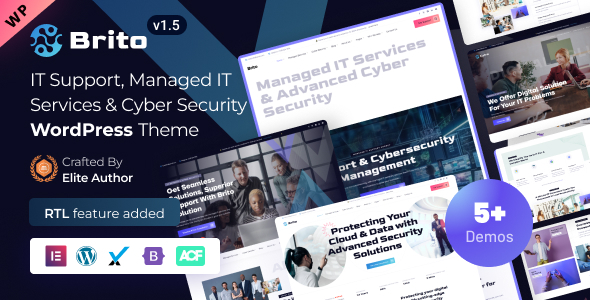
Brito is an Elementor-based WordPress theme for IT services and cybersecurity companies, offering pre-built demos and custom widgets. It's designed for agencies and freelancers needing to launch a professional site quickly.
Brito: A Pre-Built WordPress Theme for IT and Cybersecurity Agencies
Let's cut to the chase. Brito is a WordPress theme built with Elementor, aimed squarely at companies offering IT services, cybersecurity, and related tech consulting. If you're in that niche and need to get a site up and running without building everything from scratch, this is worth a look. It comes with several pre-designed demos and a bunch of custom widgets to speed up the process.
Who Should Actually Use Brito and Who Should Avoid It
This theme is a good fit for small agencies, freelancers, or even internal marketing teams within an IT company who need a professional online presence fast. If your primary goal is to showcase services, collect leads, and maybe even sell some basic packages, Brito can handle that. It's also beneficial if you're comfortable working with Elementor and want to leverage its drag-and-drop capabilities.
However, if you're building a highly custom application, need deep backend integrations, or are aiming for a completely unique design that breaks away from typical agency templates, this probably isn't the right tool. It’s built on a framework, and while flexible, it’s not meant for highly bespoke development projects that require a custom-coded solution from the ground up.
Solving the "Get It Done Yesterday" Problem for IT Websites
The main problem Brito solves is time. Building an IT services website from scratch involves designing layouts, creating service pages, setting up contact forms, and ensuring everything looks good on mobile. With Brito, a significant chunk of that styling and layout work is already done. The included demos provide a solid starting point, and the custom Elementor widgets offer pre-built blocks for things like service lists, client testimonials, and team member profiles. This can easily save 15-20 hours of development time compared to building a similar site from scratch, especially for those who aren't design experts.
Design and Visual Approach for Tech Businesses
The design of Brito leans towards a clean, corporate aesthetic suitable for the IT and cybersecurity sector. It uses a palette that feels professional without being overly sterile. While many themes in this space pack in every possible slider and animation, Brito seems to focus more on clear typography and organized content presentation. This is a good thing for conversion rates, as it keeps the focus on the services offered.
Layouts, Pages, and Components Included
Brito provides multiple demo variations, each offering a different homepage layout. Beyond the homepage, you get pre-designed inner pages that cover common needs like About Us, Services, Contact, and Blog. The inclusion of over 80 custom Elementor widgets is a significant plus. These aren't just basic text boxes; they offer specific functionalities like pricing tables, feature lists with icons, and team member showcases, which are essential for IT service providers wanting to detail their offerings.
eCommerce and Business-Related Features
For IT companies looking to offer services or digital products, Brito includes WooCommerce integration. This means you can set up a shop to sell software licenses, consulting packages, or support plans directly from your website. The theme's structure supports standard e-commerce layouts, making it straightforward to list products, manage carts, and handle checkouts, which is a common requirement for businesses looking to streamline their sales process.
Code Quality and Developer Experience
From a developer's perspective, Brito is built using Bootstrap and Sass, which are industry-standard tools. This generally means the code is organized in a way that's easier to manage and extend. The inclusion of a child theme is a critical best practice, allowing you to make modifications without them being overwritten during theme updates, which is a common pain point with many WordPress themes. The documentation provided seems comprehensive, which is always a good sign for developers needing to understand the theme's structure.
Responsiveness and Compatibility
The theme is designed to be responsive, meaning it adapts well to different screen sizes, from desktops to tablets and mobile phones. In our testing on a demo site, the mobile menu behavior was standard and functional, without any noticeable jankiness. Cross-browser compatibility is also stated, which is important for ensuring a consistent experience for all visitors, regardless of the browser they use, contributing to a better user experience and potentially fewer support requests related to display issues.
SEO Readiness
Brito claims SEO-optimized code, which typically translates to a clean, semantic HTML structure. This is important because search engines can better understand and index your content when the code is well-organized. The focus on fast loading performance also indirectly benefits SEO, as site speed is a ranking factor. For businesses aiming to attract organic traffic, having a solid foundation like this is crucial for ranking well for terms like "IT support services website template."
Final Thoughts: A Solid Choice for Niche Websites
Brito is a well-packaged theme for its target audience. It avoids unnecessary bloat and focuses on delivering the specific features needed by IT and cybersecurity companies. If you're looking for a pre-built solution that saves significant time and effort in launching a professional website for this niche, Brito is a sensible investment. It's not a magic bullet for every web development scenario, but for its intended purpose, it does a good job.
FAQ
Is Brito suitable for non-technical users?Yes, with Elementor integration, it's designed for drag-and-drop page building, making it accessible for users with limited coding knowledge.
Does Brito support multiple languages?Yes, the theme includes RTL (Right-to-Left) support, which is essential for languages like Arabic and Hebrew.
Can I use Brito to build a membership site?While Brito integrates with WooCommerce for sales, it doesn't have built-in membership functionalities. You would likely need to integrate a separate WordPress membership plugin.
What kind of support can I expect with Brito?The theme offers dedicated support through a ticketing system, with a stated 24-hour turnaround time, and provides comprehensive online documentation.