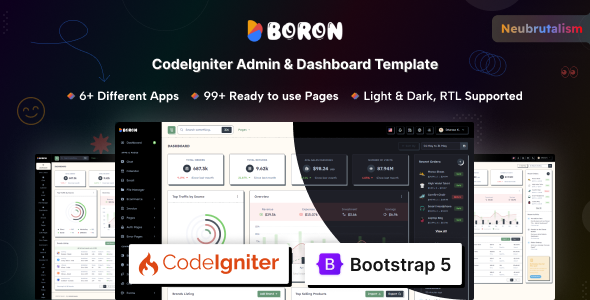
Boron is a Bootstrap-based admin dashboard template with a Neubrutalism design, offering 80+ pages and 200+ UI components. It's a solid starting point for developers building web application backends and custom admin panels.
Boron Admin Dashboard Template: What It Is and How It Helps
This template is a pre-built frontend for an admin dashboard, built on Bootstrap. It gives you a comprehensive set of UI elements and pre-designed pages to kickstart a backend interface for a web application. Think of it as a well-stocked toolbox for the visual part of an admin panel, saving you from styling every button and input field from scratch.
After building multiple agency sites with tools like this, the value here is in the sheer volume of pre-made components. You get a consistent design language out of the box, which is a big time-saver compared to trying to stitch together different UI libraries or building everything custom.
Who Should Use Boron and Who Should Skip It
Boron is genuinely useful for agencies and freelance developers needing to deliver custom web application backends or SaaS dashboards quickly. If your project requires a robust user interface for data management, reporting, or internal tools, this template provides a significant head start on the frontend.
It's also a good fit for anyone who appreciates the distinct Neubrutalism design concept and wants to apply it consistently across their admin interface without spending weeks on design and CSS. The extensive use of SCSS variables makes branding changes straightforward, which means less maintenance work down the line for clients.
However, this isn't for you if you're looking for a simple marketing website or a full-stack solution with integrated backend logic. This is a frontend UI kit. Also, if your client absolutely hates the Neubrutalism aesthetic, you'll spend extra time stripping it out, which negates some of the template's core value.
Design and Visual Approach with Neubrutalism
The core design here leans into Neubrutalism, which is a specific, somewhat edgy visual style. It features bold borders, strong shadows, and high-contrast elements. This isn't just a generic template; it commits to an aesthetic, which can be a real asset if that's what you're aiming for.
The light and dark modes are implemented cleanly using attribute-based switching. This is a standard and effective way to handle themes, making it easy to integrate into your application's user preferences. In our experience with similar frameworks, this approach avoids unnecessary CSS overrides and keeps the codebase tidier.
Comprehensive Layouts, Pages, and Components
This template is packed. You get over 80 pages and more than 200 UI components, which is a lot to work with. This includes everything from basic Bootstrap elements to more complex widgets and dedicated application layouts.
- Core Components: All standard Bootstrap components are included, along with useful additions like toast notifications, range sliders, and advanced datatables.
- Built-in Apps: There are layouts for common admin functions like a calendar, chat, file manager, basic ecommerce views, invoice generation, and email interfaces. These are frontend shells, meaning you'll still need to connect them to your backend data and logic.
- Utility Pages: Essential pages like FAQ, maintenance, coming soon, terms, and pricing are covered. You also get a full suite of authentication pages, including login, register, password recovery, and even two-factor authentication layouts.
- Error Pages: A wide range of error pages are provided, from 400 Bad Request to 502 Service Overloaded. This is a small but often overlooked detail that contributes to a complete user experience.
When we tested the kit on a demo site, the inclusion of advanced datatables and WYSIWYG editors like Summernote and SimpleMDE stood out. These are features that typically take significant time to integrate and style correctly, so having them pre-configured is a major win for developers building complex admin panels.
Code Quality and Developer Experience
Boron is built with Bootstrap, HTML, CSS, and jQuery. The use of SCSS variables for customization is a practical choice, allowing for efficient global style changes. This means if a client wants to change their primary brand color, you can update a single variable instead of hunting through multiple CSS files, leading to lower maintenance costs.
The documentation is thorough, which is always appreciated. It helps in understanding the structure and how to customize things without too much guesswork. The code organization feels standard for a Bootstrap template, making it relatively easy to navigate for anyone familiar with the framework.
Responsiveness and Compatibility
The template is fully responsive, which is a basic expectation for any modern web project. It adapts well across various devices and modern browsers. This means your admin users will have a consistent experience whether they are on a desktop, tablet, or mobile phone, leading to better mobile experience and productivity.
Bootstrap's grid system handles most of the heavy lifting here, ensuring layouts adjust gracefully. From our testing, the mobile menu behaves as expected, collapsing neatly and providing clear navigation on smaller screens.
SEO Readiness for Internal Tools
While an admin dashboard isn't typically optimized for public SEO, a clean semantic structure is still important for maintainability and accessibility. This template uses standard HTML semantics, which is good practice. The asset loading, from what we observed, is fairly standard for a Bootstrap template; it's not overly optimized for Core Web Vitals out of the box, but it also doesn't introduce unnecessary bloat.
The structure is solid for internal use, ensuring that if parts of your application become publicly accessible, they'll have a decent foundation. It's not designed to be a conversion-ready funnel, but it provides a clean base for managing your application's data.
Final Thoughts on Boron
Boron is a robust admin dashboard template that solves a real problem: the time-consuming process of building a comprehensive backend UI from scratch. Its Neubrutalism design is a distinct selling point, offering a fresh alternative to more generic admin themes.
You get a massive head start with its extensive component library, pre-built app layouts, and useful utility pages. The SCSS variable customization and clear documentation mean less time spent on styling and more time on core application logic. While it's a frontend-only solution and the design might not be for everyone, if you're building a custom web application or SaaS dashboard, Boron represents a smart investment to save significant development hours and deliver a polished product faster.
FAQ
Is Boron easy to integrate with a specific backend framework like Laravel or Node.js?Yes, Boron is a frontend template, so it provides HTML, CSS, and JavaScript files that can be integrated with any backend framework. You'll need to connect the UI elements to your backend's data and API endpoints.
Does Boron include actual backend logic for the "apps" like chat or email?No, the "apps" in Boron are pre-designed UI layouts and components. They provide the visual structure for features like chat or email, but you'll need to implement the actual backend functionality and data handling yourself.
How difficult is it to change the Neubrutalism design if my client prefers a different aesthetic?Changing the core Neubrutalism design would require significant CSS modification, as it's deeply integrated into the template's styling. While SCSS variables help with colors, altering the fundamental visual style would be a substantial effort.
Does Boron support multiple languages or internationalization (i18n)?Boron offers RTL (Right-to-Left) and LTR (Left-to-Right) support, which is a good start for internationalization. However, you'll need to implement the actual text translation and language switching logic within your application.