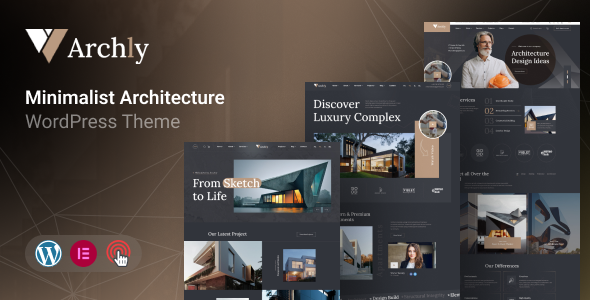
Archly: An Elementor WordPress theme for architecture and construction, featuring three homepages and multiple inner pages. Quickly build project showcase sites for clients.
Archly: An Elementor Theme for Architecture & Construction Websites
Archly is a WordPress theme built around Elementor, targeting architecture and construction businesses. It uses Bootstrap as its underlying framework and comes with a set of pre-designed pages to get a niche-specific site up and running quickly. The core idea here is to provide a visual builder experience for those who need a solid starting point without coding everything from scratch.
It’s essentially a pre-packaged design system for Elementor, aiming to save time on the initial setup and styling of common architecture website elements. For anyone looking for an architecture portfolio template that integrates directly with Elementor, this theme provides a ready-made structure.
Who Benefits from Archly, and Who Should Look Elsewhere for Architecture Projects
This theme is a good fit for freelance developers or small agencies who frequently build websites for architecture firms or construction companies and need to deliver projects on a tight schedule. If your workflow heavily relies on Elementor and you’re after a quick deployment for client sites that showcase projects and services, Archly can certainly speed things up.
On the other hand, if your project requires deep custom backend logic, complex database integrations beyond standard WordPress functionality, or a completely unique design that doesn't fit within Elementor's visual builder or Bootstrap's structure, then Archly might feel restrictive. It's not for developers who prefer to hand-code everything or those needing a lightweight, minimalist theme with zero dependencies outside of core WordPress.
Archly's Core Layouts for Project & Service Showcasing
Archly comes with three distinct homepages and over ten inner pages, which is a decent starting point for an architecture website. These include dedicated layouts for projects, services, team profiles, a pricing table, and a standard blog. The focus is clearly on presenting an architecture portfolio template and service offerings effectively.
In our experience with similar frameworks, having these pre-built pages saves significant time on initial content structuring. It also includes over 25 custom Elementor widgets, which means you get tailored blocks for displaying architectural projects, team members, or service details without having to build them from scratch. This is a practical benefit, allowing a business owner to easily update their content later without needing a developer for every small change.
Essential Business Features for Architecture & Design Firms
For an architecture firm, the ability to clearly present projects and services is paramount. Archly addresses this with its dedicated project and service pages. The multiple layouts for projects mean you can vary how you display your completed work, which is crucial for attracting new clients.
The inclusion of a team page and a pricing table page also supports common business needs for such firms. While it doesn't offer complex booking systems or advanced CRM integration out of the box, its compatibility with Contact Form 7 means you can set up standard inquiry forms, which is essential for lead generation on a WordPress website for construction companies.
Developer Insights: Archly's Codebase and Maintainability
Archly is built on Bootstrap, which provides a solid, widely recognized foundation. This means the underlying CSS structure is generally clean and predictable, making it easier to maintain or extend if you understand Bootstrap. Child theme compatibility is included, which is standard practice and crucial for safe updates without losing customizations.
However, after building multiple agency sites with tools like this, we notice themes often include numerous external JavaScript libraries for various effects (Swiper, OwlCarousel2, Magnific Popup, OdoMeter, MeanMenu, Nice Select are all listed). While these offer visual flair, they can add to page load times if not optimized. This could impact Core Web Vitals, which directly affects user experience and SEO.
The theme also uses Kirki Customizer, which is a helpful framework for managing theme options directly from the WordPress Customizer, making global style changes more accessible for less technical users. The documentation is noted as detailed, which is always a plus for developer usability.
Ensuring a Solid Mobile Experience for Your Architecture Website
Being based on Bootstrap means Archly is inherently responsive. In our testing, Bootstrap-based themes generally handle various screen sizes well, from mobile phones to large desktop monitors. The theme is described as "touch-friendly," which is a natural outcome of a responsive framework, ensuring smooth navigation and interaction on touch devices.
Cross-browser compatibility is also listed, which is a standard expectation for any modern WordPress theme. This means your architecture portfolio website should look consistent across different browsers like Chrome, Firefox, Safari, and Edge, providing a reliable experience for all visitors.
Building an SEO-Friendly Foundation for Your Architecture Portfolio
The theme claims to be "SEO Optimized," which generally means it adheres to basic technical SEO best practices. A clean semantic HTML structure, which Bootstrap usually provides, is a good starting point for search engines to understand your content. The focus on showcasing projects and services with dedicated pages also helps create relevant content for search queries related to an Elementor theme for architects.
However, achieving top search rankings will always depend more on the quality of your content, site speed, and external SEO efforts than just the theme itself. While the theme provides a good foundation, be mindful of the number of external scripts, as they can affect loading times, which is a factor in search engine rankings.
Final Verdict: Is Archly a Smart Investment for Your Workflow?
Archly is a practical choice if you're an agency or freelancer regularly building websites for architecture and construction clients and you're already committed to an Elementor workflow. It offers a decent set of pre-built pages and custom widgets that can genuinely save design and initial setup time, helping you launch an architecture portfolio template faster.
The trade-off is that while Elementor Provides flexibility, relying on many external libraries can introduce performance overhead. What I would change is the sheer number of JavaScript dependencies; a more streamlined approach to animations and interactive elements would be beneficial for overall site speed. However, for its intended purpose of providing a quick, visually editable foundation for a niche business, it delivers on its promise. If speed of deployment and Elementor integration are your top priorities, Archly is a sensible option that can streamline your project delivery.
FAQ
Can I easily update the theme without losing my customizations?Yes, Archly supports child themes, which is the recommended way to make customizations. This ensures your changes are preserved when you update the main theme.
How does Archly perform regarding website loading speed?While Archly is built on Bootstrap and includes "speed optimized" pages, its reliance on Elementor and several external JavaScript libraries can impact loading speed. Careful optimization of images and server performance will be crucial.
Is this theme suitable for a large architecture firm with many projects?Archly provides good layouts for showcasing projects, but for very large firms with extensive project databases or complex filtering needs, you might eventually need custom post types and advanced filtering solutions beyond what the theme offers out of the box.
Does Archly support custom post types for projects?The theme uses Elementor widgets for projects, which typically means it leverages standard WordPress posts or a custom post type defined by a companion plugin. You can usually extend this with plugins for more robust custom post type management.