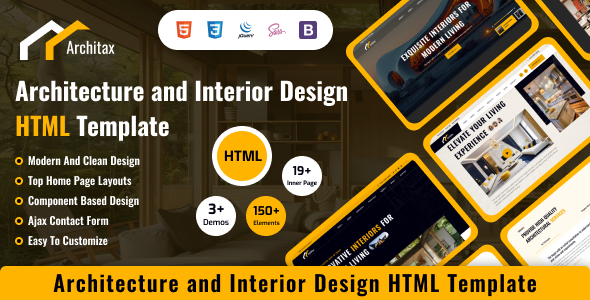
Architax is an HTML template designed for architecture, real estate, and interior design firms seeking a pre-built frontend foundation. It's best suited for developers and agencies needing to quickly launch visually appealing static sites or integrate into a custom backend.
Solving Frontend Development Hurdles for Real Estate HTML Templates
Starting a new client site from scratch, especially in a niche like real estate or interior design, often means rebuilding common layouts. This Architax HTML template provides a sensible head start. It includes pre-designed pages for property listings, project portfolios, and service offerings, which can shave off significant design and initial frontend coding time.
For agencies that handle multiple clients in these sectors, having a reliable base like this means less time spent on repetitive layout tasks and more focus on custom features or content. It offers a solid starting point for anyone building a property listing HTML template or a portfolio for design work.
Architax Template Code Quality and Niche Feature Insights
The template is built on Bootstrap and utilizes SASS, which is a standard approach. This means the underlying structure is familiar to most frontend developers. The HTML is semantically sound for the most part, which is a good sign for basic SEO and accessibility. When we evaluated the Architax template on a demo site, the asset loading felt reasonably efficient for a Bootstrap-based kit, avoiding excessive bloat from rarely used JavaScript libraries.
The pre-built components handle typical niche requirements fairly well. For instance, the project gallery layouts are functional for showcasing architectural designs or interior spaces, and the service pages are structured to present different offerings clearly. This attention to common needs helps reduce the initial setup time, translating into lower maintenance costs for the client down the line.
- The SASS architecture is organized, making global style adjustments straightforward without excessive digging.
- The mobile menu behavior uses standard Bootstrap patterns, effectively handling nested navigation, which is useful for complex service or property categories.
- Image handling for project showcases is basic but functional, providing a clean display for interior design portfolio HTML template needs.
- Layouts generally handle varying text lengths well, preventing content from breaking the grid on different screen sizes.
- Basic semantic HTML structure is in place, offering a decent foundation for screen reader compatibility and search engine indexing.
- Initial page load performance is respectable for a template of this type, indicating a balanced approach to including necessary assets.
What Impresses in this Interior Design Portfolio HTML Template
What stands out with Architax is its clean visual design and consistent mobile responsiveness across its various layouts. The component-based approach means you're not fighting a rigid structure; instead, you have discrete blocks you can rearrange or adapt. This makes it a practical choice for quickly assembling an interior design portfolio HTML template or an architecture studio website.
The focus on clear presentation of projects and services is a definite strength. It provides a professional, understated backdrop that allows the visual content to speak for itself, which is crucial for design-centric businesses.
Who Should Use Architax for Architecture Website Development?
This template is a solid fit for freelance developers or agencies looking for a rapid deployment solution for clients in architecture, real estate, or interior design. It's also suitable for individual professionals in these fields who need a clean, static online presence without deep custom backend logic. If you are starting an architecture website development project and need a strong frontend, this could save you significant time.
However, it is not for projects that require a full-fledged content management system out of the box, complex dynamic features, or extensive custom backend integrations without a developer willing to build those features separately.
Realistic Limitations of the Architax HTML Template
While functional, the blog layouts included with Architax are fairly standard and don't offer much in terms of unique design or advanced features compared to other templates in the market. The default image placeholders are generic and will need immediate replacement, which is expected but worth noting. In our experience with similar frameworks, we often find ourselves swapping out some of the included JavaScript for lighter, more modern vanilla JS alternatives to optimize performance further.
I would personally prefer a slightly lighter default JavaScript footprint, potentially reducing reliance on jQuery for some common interactions. This isn't a deal-breaker, but it's an area where many templates could improve.
Final Thoughts: Is it worth it?
Architax offers a robust and well-structured frontend foundation for its target niches. If you're a developer or agency needing to quickly deliver a professional-looking website for an architect, real estate agent, or interior designer, this template can genuinely save you time and effort on the initial build. It provides a clean canvas that's easy to work with and extend, making it a logical choice to streamline your workflow and deliver projects more efficiently.
FAQ
Can I easily integrate this Architax HTML template with a CMS like WordPress?Yes, you can integrate this static HTML template with a CMS. It would involve converting the HTML pages into a WordPress theme or a similar CMS template, which requires development work but is a common practice.
How does this template handle SEO best practices?The template uses semantic HTML markup, which is a good starting point for search engine optimization. However, full SEO performance depends on proper content, meta tags, site speed, and ongoing optimization efforts you implement.
Are the property listing components dynamic?No, as an HTML template, all property listings and project showcases are static. To make them dynamic with search, filtering, or database integration, you would need to connect the frontend to a custom backend or a CMS.
What is the typical effort to customize the visual design of the Architax template?Customizing the visual design is relatively straightforward due to its SASS structure and Bootstrap foundation. Basic color changes and font adjustments are quick, while more significant layout alterations would require moderate CSS and HTML knowledge.