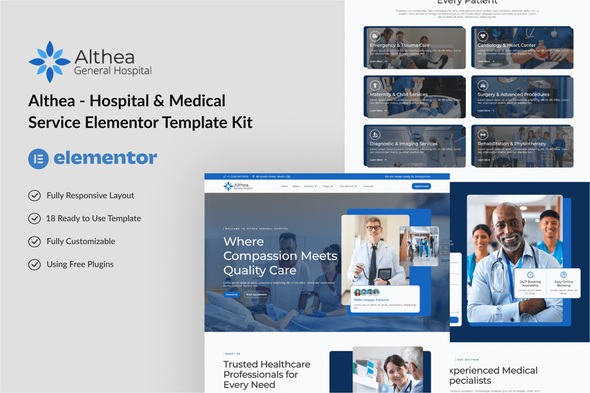
The Althea Elementor Template Kit offers a collection of pre-designed pages for medical, hospital, and clinic websites, providing a solid starting point for anyone building a healthcare online presence using the free version of Elementor.
Solving Common Hurdles in Medical Website Development
Building a website for a medical clinic or healthcare provider often involves specific page types like doctor profiles, detailed service descriptions, and appointment booking forms. This Althea Elementor kit addresses that by providing these layouts upfront, saving a significant amount of time compared to building them from scratch with a blank canvas.
In our experience with similar frameworks, getting these niche-specific pages structured and styled can easily consume 10-15 hours per project. This kit delivers a ready-to-use foundation, which translates directly into faster project turnarounds and reduced development costs for clients seeking efficient medical website design templates.
Under the Hood: Althea's Technical Standards and Feature Set
Althea is built for the free version of Elementor, which is a common choice for many projects. It relies on a few additional free plugins: ElementsKit Lite, MetForm, and Gum Elementor Addon. While this keeps the initial cost down, it means managing updates and potential compatibility across several plugin dependencies.
The templates themselves offer a clean visual style, suitable for medical environments where clarity and trust are key. The inclusion of dedicated pages for doctors and services helps establish authority and convey necessary information, which is crucial for conversion-ready funnels in the healthcare sector.
- The overall CSS organization follows standard Elementor practices, meaning global styles are in place, but deeper customizations will require navigating Elementor's interface or overriding its output.
- Mobile responsiveness is standard, and the mobile menu behavior is functional, adapting well to smaller screens without significant layout shifts.
- Regarding asset loading, the reliance on multiple free Elementor addons means more external scripts and styles are loaded. This can impact initial page load times and, consequently, your site's Core Web Vitals scores if not optimized further.
- The templates use a generally clean semantic structure for headings and content blocks, which is beneficial for search engine optimization and basic accessibility practices.
- Form integration is handled via MetForm, a common Elementor add-on. While functional, proper setup is required to ensure patient data privacy and compliance with regulations like GDPR, especially for sensitive medical information.
What Althea Gets Right for Healthcare Websites
What impresses most about Althea is its direct focus on the core needs of a medical or healthcare site. The inclusion of pages like 'Doctors Details', 'Services Details', and 'Appointment' means you're not starting from zero on the most critical content types. It's a pragmatic approach to getting a functional site online quickly.
The design, while not groundbreaking, is professional and reassuring, which is the right tone for this niche. It allows for quick content population without extensive design decisions, making it an efficient Elementor template kit for medical clinics.
Is This Elementor Kit Right for Your Next Clinic Project?
This kit is ideal for freelance developers, small agencies, or individual clinic owners who need to launch a professional-looking medical website quickly without a large budget for custom design or Elementor Pro. It provides a solid, pre-built structure that can be easily populated with content.
However, if your project demands highly unique branding, deep custom backend logic for complex patient portals, or if you prioritize an absolute minimal plugin footprint for extreme performance, this kit might not be your best fit.
Althea's Practical Limitations and Considerations
One aspect that feels average is the reliance on multiple third-party Elementor addons. While these are free, they add layers of complexity and potential points of failure or performance bottlenecks compared to a more streamlined solution using fewer dependencies. Managing updates for Elementor, ElementsKit Lite, MetForm, and Gum Elementor Addon simultaneously can become a maintenance task.
Additionally, while the design is clean, it's fairly standard for the medical niche. Those looking for a truly distinctive visual identity might find themselves doing significant customization work, which could negate some of the initial time-saving benefits.
Final Thoughts: Is it worth it?
Despite its reliance on several plugins, the Althea Elementor Template Kit is a genuinely useful tool for specific scenarios. For anyone needing to rapidly deploy a professional, feature-rich medical or healthcare website with Elementor, it offers a clear path forward. The time saved on structuring key pages and styling them makes it a smart investment, allowing you to focus on content and client-specific refinements rather than foundational layout work.
FAQ
How does Althea handle patient appointment scheduling?Althea integrates with MetForm for appointment requests. This means patients fill out a form, and the clinic then follows up to confirm the appointment, rather than a real-time booking system.
What is the impact of using multiple Elementor addons on site performance?Each additional plugin, even free ones, adds more code to load, which can increase page load times and potentially affect Core Web Vitals scores. Careful optimization of images and server-side caching will be important.
Can Althea be easily customized for specific medical specializations?Yes, the templates provide a flexible base. You can easily swap out images, text, and adjust colors within Elementor to tailor the site for dentistry, physiotherapy, general practice, or other medical niches.
Are the templates designed with accessibility standards in mind for a medical audience?The kit provides a clean semantic structure for headings and uses clear typography, which are good starting points for accessibility. However, specific ARIA attributes or advanced keyboard navigation might require further manual implementation or Elementor Pro features.