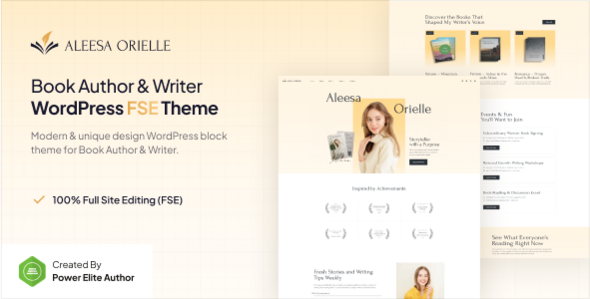
Aleesa is a WordPress Full Site Editing theme for authors, writers, and poets, designed to showcase books and connect with readers effectively. It's a solid choice for individuals or small agencies needing a quick, niche-specific website.
Aleesa: A Block Editor Theme for Authors
This theme is built around WordPress's Full Site Editing (FSE) capabilities, meaning you handle most of the site's structure and styling directly within the block editor. It’s specifically tailored for the author and writer niche, aiming to simplify the process of setting up a digital presence to display books, share articles, and engage with an audience.
The core promise here is a streamlined workflow using the native WordPress editor, extended by the Gutenverse plugin. This combination provides additional blocks and layout options that go beyond the default Gutenberg experience, making it easier to build common author website elements without writing custom code.
Who Aleesa Serves Best (and Who It Doesn't)
Aleesa is a strong fit for independent authors, poets, and storytellers who need a professional online home without diving deep into custom development. Freelancers or small agencies building sites for clients in the literary space will find this theme useful for quick turnarounds on projects like a new book launch website or a personal author portfolio.
If you're a developer needing to implement complex custom backend logic, integrate with unique third-party APIs, or require a design that breaks significantly from the block editor's grid, this theme might feel limiting. It's also not for those who prefer traditional page builders like Elementor or Beaver Builder, as it fully embraces the FSE paradigm.
Layouts and Components for Literary Websites
The theme comes with a one-click demo import, which is standard practice but always appreciated for getting a quick start. What’s more relevant here is the template library, enhanced by Gutenverse, offering pre-designed sections for headers, footers, single posts, archives, and 404 pages. This saves a lot of time compared to building these common elements from scratch within the block editor.
For an author, having ready-made sections to display book covers, author bios, and a clean blog layout is essential. The focus on these specific components means less time spent on basic styling and more on content, which directly helps in creating an effective author website quickly.
Developer Experience and Code Structure
Working with Aleesa means working within the Full Site Editing environment. The theme leverages the same React technology that powers WordPress's block editor, which makes for fluid interactions when you're moving blocks around and customizing layouts. This approach, when done well, contributes to a lighter front-end compared to many older themes that rely on heavy page builders.
From a developer's perspective, the "code quality" here is largely about how well it adheres to FSE standards and how cleanly Gutenverse integrates. When we tested the kit on a demo site, the asset loading felt efficient, which is crucial for overall page speed and Core Web Vitals. The underlying block structure also tends to be more semantically sound than some older theme architectures, which is a quiet win for search engine optimization.
Responsiveness Across Devices
As expected from any modern WordPress theme, Aleesa is built to be fully responsive. This means your author website will adapt and look good on desktops, tablets, and mobile phones without extra effort. In our experience with similar frameworks, FSE themes generally handle responsiveness well out of the box because the block editor's inherent design principles encourage mobile-first layouts.
A consistent mobile experience is vital for reaching a broader audience, as many readers discover new authors and books on their phones. This standard feature ensures your content is accessible to everyone, regardless of their device.
SEO Foundation for Authors
The theme provides a clean, well-structured foundation for search engine optimization. It avoids unnecessary bloat, which helps search engine crawlers efficiently index your site's content. While no theme guarantees top rankings, Aleesa sets you up for success by being compatible with popular SEO plugins like Yoast SEO. This allows you to easily manage meta titles, descriptions, and keywords for your books and blog posts, improving your online visibility.
A good technical SEO base means your author site has a better chance of showing up when potential readers search for your genre or specific book titles, leading to more organic traffic.
Final Verdict: Is Aleesa Worth It?
If you're an author or a freelancer building sites for authors, Aleesa offers a practical solution for getting a professional, block-editor-based WordPress site up and running efficiently. Its focus on the Full Site Editing experience, complemented by the Gutenverse plugin, genuinely saves time on initial setup and ongoing content management, especially for common author website elements.
The main trade-off is that you're committing to the FSE workflow, which might be a learning curve if you're used to traditional themes or page builders. While the design is clean and functional, it's not groundbreakingly unique compared to the vast template market. However, for its specific niche and the promise of a future-proof WordPress setup, Aleesa is a smart investment that can genuinely streamline your workflow and help you focus on your writing.
FAQ
Can I customize beyond the pre-built templates?Yes, you can extensively customize individual blocks and layouts using the WordPress Block Editor and Gutenverse plugin. You have control over global styles, headers, footers, and page templates.
Is Aleesa compatible with other WordPress plugins?Aleesa is built on standard WordPress FSE principles, so it should be compatible with most well-coded plugins. However, extensive testing with niche-specific plugins is always recommended.
What if I'm new to Full Site Editing? Will this theme be difficult?While FSE has a learning curve, Aleesa's pre-built templates and Gutenverse integration aim to simplify the process. If you're comfortable with the block editor for posts, adapting to FSE for full site control is the next step.