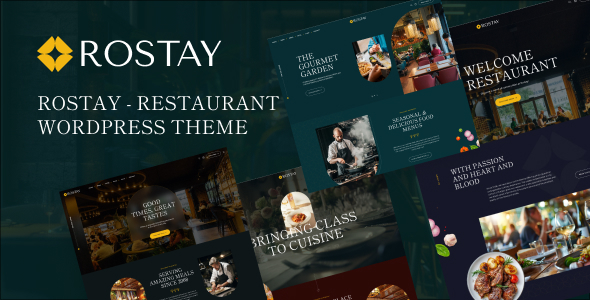
Rostay is an Elementor WordPress theme for restaurants, cafes, and bistros, offering four distinct layouts, a booking system, and WooCommerce integration. It's built for rapid deployment of food service websites.
Rostay: An Elementor WordPress Theme for Eateries
Alright, so you're looking at Rostay, another Elementor WordPress theme pitched for the food service industry. What you get here is a pre-packaged solution aiming to streamline the build process for restaurant and cafe sites. It’s essentially a collection of Elementor templates and global styles wrapped in a theme, designed to give you a head start rather than building everything from scratch.
After building multiple agency sites with tools like this, the core value proposition is clear: it saves you from designing every menu item, reservation form, and team page individually. This particular Elementor restaurant theme for cafes and bistros tries to cover the common needs of these businesses, from showcasing food to taking bookings.
Who Benefits from this Restaurant Theme and Who Should Skip It
This theme is genuinely useful for agencies or freelancers who need to launch restaurant, cafe, or bakery websites quickly without deep custom coding. If your client needs a decent online presence fast, with standard features like a menu and booking, this theme can cut down development time significantly. Small business owners comfortable navigating Elementor could also get a lot out of it, provided their needs align with the pre-built components.
However, if you're building a highly bespoke platform requiring complex backend logic, custom database integrations, or a design that deviates heavily from the provided layouts, this isn't for you. It's also not ideal for developers who prefer to code everything from the ground up or minimize reliance on page builders for performance reasons. This is not the best Elementor template for bistros if you plan extensive, unique functionality outside of what's included.
Designing Your Digital Menu and Events
The theme provides four main homepage layouts. In our experience with similar frameworks, these act as starting points. You’ll find dedicated sections for food menus, which is critical for any restaurant website. The menu layout is clean and functional, making it straightforward to list dishes and prices.
There's also a section for showcasing your team, which is a nice touch for personalizing a business. The news and events section is standard blog functionality, but it's styled to fit the theme, allowing businesses to keep customers updated on specials or happenings.
Key Business Features: Reservations and Sales
One of the standout features here is the integrated online reservation system. For a WordPress theme with online reservation system capabilities, this is often a major time-saver. It handles the basic booking flow, which is exactly what most restaurant clients need without the complexity of a third-party plugin setup.
The WooCommerce integration means you can set up an online shop if the restaurant wants to sell merchandise, gift cards, or even take-home meal kits. This is a common requirement, and having it pre-styled within the theme saves a lot of hassle compared to integrating WooCommerce into a barebones theme.
SEO Readiness and Performance Considerations
From an SEO perspective, the theme generally adheres to standard practices. The semantic structure for headings and content areas appears clean, which helps search engines understand the page hierarchy. While the theme claims fast setup, remember that Elementor-based themes can sometimes introduce extra DOM elements, potentially impacting Core Web Vitals if not optimized correctly.
The font loading appears to follow standard practices, which is important for GDPR compliance and initial page load speed. You'll still need to handle image optimization and server configuration, but the foundational structure is there for good technical SEO.
Final Thoughts on Rostay's Practicality
Rostay is a practical tool for a specific niche. It solves the headache of setting up a niche-specific booking flow and menu system, which can easily eat up days of development time on a custom build. The one-click demo import works as expected, getting you to a functional starting point quickly.
What feels average, though, is the general Elementor implementation; it doesn't bring anything revolutionary to the page builder experience. You get the flexibility Elementor offers, but it also comes with the typical overhead. Overall, if you need to build a restaurant or cafe website efficiently and your client's needs fit the template's offerings, Rostay is a smart investment that will save you time and effort.
FAQ
Does Rostay rely heavily on Elementor Pro, or can it function with the free version?Rostay is built with Elementor Free in mind, but many advanced features or custom styling options might benefit from Elementor Pro, especially for deeper customization.
How easy is it to change the overall color scheme and typography across the entire theme?Changing the color scheme and typography is straightforward through Elementor's global settings and the theme customizer, allowing for consistent branding updates without touching code.
What happens to the reservation system if I decide to switch themes later?The reservation system is typically integrated directly into the theme, so if you switch themes, you would lose that functionality and need to implement a new booking solution.