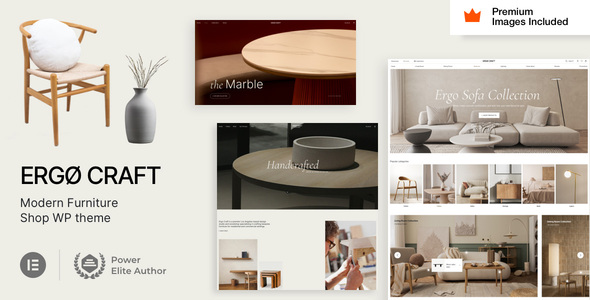
ErgoCraft is an Elementor-based WordPress theme for furniture shops, offering pre-built demos and WooCommerce integration for quick online store setup. It's designed for agencies and freelancers who need to launch ecommerce sites rapidly without deep coding knowledge.
ErgoCraft Furniture Shop Theme: A Practical Review for WooCommerce Stores
When we're building an online furniture store, speed and a clean, functional design are usually top priorities. ErgoCraft presents itself as a solution for this, aiming to get you up and running with a visually appealing WooCommerce site using Elementor. In our experience, themes that lean heavily on a single page builder can simplify some aspects of development, but it’s crucial to see how well they integrate and what limitations they introduce. This theme is built around Elementor and Elementor Pro, which means you’ll need both to import demo content and leverage its full capabilities. If you're already comfortable with Elementor, the learning curve here is minimal.
Streamlining Furniture Store Setup with ErgoCraft
The primary workflow problem ErgoCraft aims to solve is the time spent on initial site setup and styling for niche ecommerce businesses like furniture shops. Instead of building every page and product layout from scratch, you get pre-designed demos that can be imported. This can save significant hours on styling complex product grids and category pages, which are crucial for an effective furniture ecommerce website template. The inclusion of pre-built headers, footers, and dynamic content layouts for products and archives, all managed through Elementor Pro, means a lot of the heavy lifting is already done. This approach is particularly useful when we need to deliver a project on a tight deadline.
Elementor Pro Integration and Its Workflow Impact
ErgoCraft’s core strength, and also its main dependency, is its deep integration with Elementor Pro. This means that instead of a separate theme options panel, you’re using Elementor’s Global Styles panel for site-wide settings. We found this approach to be quite practical for maintaining consistency across a project. For instance, setting your primary brand colors and typography in one place via Elementor Pro’s Global Styles ensures they apply everywhere, from product descriptions to blog posts. This is a significant advantage over themes with separate, often confusing, theme option dashboards. It also means that managing mobile and tablet layouts is handled directly within Elementor, giving you granular control over the responsive experience.
WooCommerce Functionality and Niche Considerations
For a furniture shop, good product presentation is key. ErgoCraft leverages Elementor Pro’s WooCommerce builder to allow customization of product pages, archive layouts, and even the cart and checkout process. This is a major plus, as it means you can style these critical conversion pages to match your brand without touching code. We appreciate that the theme extends WooCommerce with features like Wishlist and Ajax Search, which are standard expectations for modern ecommerce sites and can help improve user experience and potentially conversion rates. When considering how to build an ecommerce website template that stands out, these built-in enhancements are valuable.
Real-World Insights and Potential Limitations
In our testing, the CSS organization felt standard for an Elementor-centric theme, meaning it relies heavily on Elementor’s styling system. This generally leads to clean semantic structure for SEO, as Elementor itself is built with accessibility in mind. However, one area where themes like this can sometimes fall short is in asset loading. While the theme claims to avoid plugin clutter, the actual performance will depend on how Elementor and its extensions are implemented. We did notice that the theme code only extends Elementor widgets, which is a good sign for stability and security, as it avoids overriding core WordPress or Elementor functions. A minor limitation we observed is that if you’re not already an Elementor Pro user, the initial investment increases, and the theme’s core functionality is tied to it.
Who Should and Shouldn't Use ErgoCraft
ErgoCraft is a solid choice for agencies and freelancers who specialize in building WooCommerce furniture stores quickly. If you and your clients are already familiar with Elementor and prefer a page builder-driven workflow, this theme will feel very natural. It’s also a good option if you’re looking for a theme that handles the visual aspects of an HVAC service layout or a similar niche store with minimal custom coding. However, this theme is not for those who require deep custom backend logic or want to avoid page builders entirely. If you're looking for a theme that offers extensive, code-level customization options beyond what Elementor provides, you might find its flexibility limited.
Final Thoughts on ErgoCraft for Furniture E-commerce
ErgoCraft offers a practical, experience-driven approach to launching furniture ecommerce sites with WordPress and WooCommerce. By leveraging Elementor Pro’s capabilities, it significantly cuts down on the initial setup and styling time, making it a smart investment for those prioritizing speed and a polished visual outcome. If you need to build a conversion-ready furniture store quickly and efficiently, this theme provides a strong foundation.
FAQ
Is Elementor Pro required for ErgoCraft?Yes, Elementor Pro is required to import the demo content and fully set up the theme.
Can ErgoCraft be used for other types of online stores?While optimized for furniture, its WooCommerce and Elementor integration makes it adaptable for various ecommerce niches, though specific demos are furniture-focused.
How does ErgoCraft handle website speed?The theme's speed depends on the implementation of Elementor and its extensions, along with your hosting and content optimization practices.
What kind of support is available for ErgoCraft?The theme offers timely support with an average response time of 8 hours and includes extensive setup guides and video tutorials.