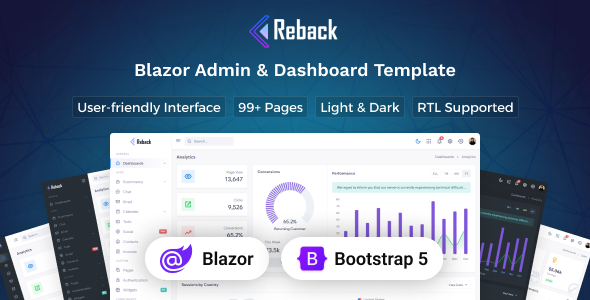
Reback is a Blazor admin dashboard template built with Bootstrap, offering 85+ pages and 400+ UI components for quickly building backend interfaces. It’s designed for developers needing a fast start on Blazor projects.
Reback: A Blazor Admin Dashboard Starter Kit
This product is essentially a UI kit for building admin panels and dashboards using Blazor and Bootstrap. It’s not a full application, but a robust frontend scaffold. The main problem it solves is the significant time sink of setting up a new admin interface from scratch—designing layouts, building common components, and ensuring responsiveness across devices.
For anyone working with Blazor who needs a functional, good-looking backend UI quickly, this template provides a solid head start. It saves countless hours on boilerplate UI development, allowing developers to focus on the core business logic instead.
Who Benefits from Reback, and Who Should Look Elsewhere?
Reback is ideal for Blazor developers, agencies, and freelancers tasked with delivering internal tools, CRM systems, or SaaS backends on tight deadlines. If your project requires a standard administrative interface and you want to leverage Blazor, this kit provides a comprehensive foundation.
However, if you're not working with Blazor, this template won't be useful. It's also not for projects demanding a highly unique, custom-designed UI that deviates significantly from Bootstrap conventions, as adapting it extensively would negate the time-saving benefits.
Design and Visuals: A Bootstrap Foundation for Blazor Dashboards
The design is clean and modern, as you’d expect from a well-implemented Bootstrap template. It sticks to functional aesthetics rather than flashy elements, which is generally what you want in an admin dashboard. The inclusion of both light and dark versions, managed purely with CSS, is standard practice and easy to switch.
The 5 different layout types offer practical variations for sidebar and topbar arrangements, giving you options without needing to re-architect the entire navigation. This flexibility is useful for accommodating different dashboard information hierarchies.
Navigating Reback's Pages and UI Components
Reback comes packed with content. You get over 85 pre-built pages and more than 400 UI components. This is a lot of material to work with, covering almost any typical admin screen you might need.
The 85+ pages cover typical admin needs, from dashboards and forms to tables and utility pages like login/register. This is a solid foundation, meaning less time spent creating common views.
With 400+ UI components, you get a good toolkit for building out custom views without starting from scratch. This includes everything from basic buttons and cards to more complex elements like charts and form wizards.
The included ready-to-use apps like Calendar, Chat, Mailbox, and eCommerce are a big plus for common backend functionalities. They provide a significant head start on these modules, saving significant development time on frequently requested features.
Developer Experience: Customization and Code Structure
Built with Blazor and Bootstrap, the underlying technologies are well-understood. The template's emphasis on SCSS variables for customization is a good sign. It means you can adjust global styles like colors, fonts, and spacing from a central place, which simplifies branding changes and ongoing maintenance.
The use of SCSS variables for customization means you can adjust colors, fonts, and spacing globally without digging through individual component files. This keeps maintenance costs down and speeds up branding changes.
Full documentation is always a good sign for a template like this. It means less time spent reverse-engineering someone else's code, which is a common headache with templates and leads to lower long-term maintenance costs.
RTL and LTR support is included, which is useful if you're building for a global audience. This saves the hassle of custom CSS adjustments for right-to-left languages, broadening your project’s reach.
The code organization feels standard for a Bootstrap-based Blazor UI kit. While the sheer number of components is impressive, a developer might still need to prune unused assets to optimize the final bundle size for leaner production builds. This is a common, practical step when working with comprehensive UI libraries.
Device and Browser Performance for Blazor Admin Panels
The template is fully responsive and works across all modern browsers and devices, including Chrome, Firefox, Safari, and Edge. This is a given for any Bootstrap-based product, ensuring that admin users can access the dashboard comfortably from desktops, tablets, or phones. The layouts adapt well, which is crucial for internal tools where users might be on various screen sizes.
Technical Foundations for Search Engine Visibility
For an internal admin dashboard, traditional SEO for public visibility isn't the primary concern. However, the clean semantic HTML structure provided by a well-built Bootstrap template still offers benefits. It contributes to faster page loading, which improves the user experience for your internal team.
A clean structure also helps with accessibility, ensuring your internal tools are usable by a wider range of users. These factors indirectly contribute to a more efficient and pleasant working environment for anyone using the dashboard.
Final Thoughts: Is Reback a Smart Investment for Blazor Development?
Reback is a solid, well-equipped Blazor admin dashboard template. It genuinely saves significant time on UI development, especially with its extensive set of pre-built pages and ready-to-use application modules. The Blazor and Bootstrap foundation is a known quantity, offering stability and a familiar development environment.
If you're a Blazor developer or an agency regularly building admin panels, this template is a smart investment to accelerate your workflow and deliver projects faster. You get a comprehensive frontend scaffold, allowing you to focus your resources on integrating your specific backend logic rather than spending time on common UI elements.
FAQ
Does Reback include a backend API or database integration?No, Reback is strictly a frontend UI kit for Blazor. It provides the visual components and page layouts, but you will need to implement your own backend API and database integration separately.
Can I easily change the overall branding and colors?Yes, the template is built with SCSS variables, which allows for straightforward customization of colors, fonts, and other global styles from a central location to match your branding.
Is this template suitable for a multi-tenant SaaS application?As a UI kit, Reback provides an excellent visual foundation for a multi-tenant SaaS application's admin panel. However, you will need to build the multi-tenancy logic and security features into your Blazor application and backend.
How does Reback handle data display for large datasets?The template includes various table components and charting libraries. For large datasets, you would typically integrate these with server-side pagination, filtering, and sorting to ensure optimal performance, which is a standard Blazor development practice.