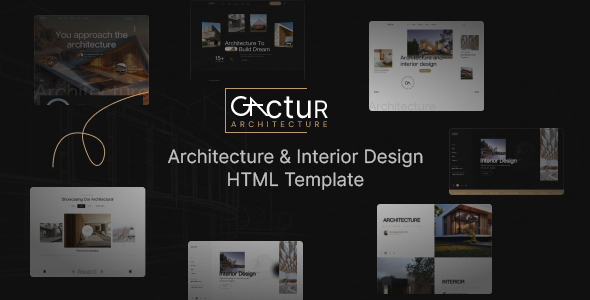
Gactur: An HTML template for architecture, interior design, and portfolio sites. It offers a clean, responsive Bootstrap layout for quick static site launches.
Product Overview: Gactur for Architecture and Interior Design Projects
Gactur is a straightforward HTML template aimed at the architecture and interior design niche. It provides a pre-built set of pages and components, ready for you to drop in your content. Think of it as a solid starting point if you need a static portfolio website or a basic online presence for a firm.
This template is built on Bootstrap, which means it uses a widely understood framework for its structure and responsiveness. This is a common approach for HTML templates and generally ensures a consistent display across various devices.
Intended Users for This Architecture HTML Template
This architecture interior design HTML template is primarily for freelancers or agencies needing a fast turnaround on client projects. If your client requires a clean, static site to showcase their work without complex backend functionality, Gactur fits the bill.
It's also suitable for small businesses or individual professionals looking to establish an online portfolio quickly. However, this is not for those needing a content management system (CMS) or deep custom backend logic. If you need dynamic content, user accounts, or extensive database interactions, you'll need to integrate this with a separate system or look for a different type of solution.
Design and Visual Approach for an Interior Design Portfolio
The design of Gactur is clean and functional, leaning towards a modern aesthetic without being overly trendy. It uses a standard grid layout, which is expected given its Bootstrap foundation. The visual elements are generally balanced, focusing on clear presentation of images and text, which is important for an interior design portfolio.
The template incorporates Google Fonts like Poppins and Roboto, which are common and load efficiently. This approach helps maintain decent page speed and provides a consistent look across different browsers. It doesn't push any radical design boundaries, but it delivers a professional and uncluttered appearance.
Layouts, Pages, and Included Components
When you get Gactur, you're essentially receiving a collection of HTML files, CSS, and JavaScript. The description mentions it's "perfect for portfolios, businesses, blogs, and all kinds of publishing websites." This implies a standard set of pages like home, about, services, portfolio/projects, blog, and contact.
- The included demo content provides a visual guide for how to structure your own projects.
- It uses common UI elements, which means most developers will find it familiar to work with.
Based on similar templates we've tested, you can expect well-defined sections for showcasing project images, client testimonials, and service descriptions. This saves significant time compared to building these common layouts from scratch.
Code Quality and Developer Experience with Gactur
The template is built on Bootstrap and uses jQuery, which are standard choices for many static HTML projects. The promise of "well organized and nicely commented" code is always welcome. In our experience with similar frameworks, good commenting reduces maintenance costs and makes future updates much easier for any developer stepping in.
Setting this up is a straightforward file transfer to your server. Changing a primary color or font involves finding the right CSS variables or Bootstrap utility classes, which is a common task for developers. The asset loading feels typical for a static site, meaning it should perform reasonably well out of the box without heavy scripts bogging it down.
Responsiveness and Cross-Browser Compatibility
Being based on Bootstrap, Gactur is inherently responsive. This means the layout automatically adjusts to different screen sizes, from mobile phones to large desktop monitors. For a business owner, this translates to a consistent and good-looking website experience for all visitors, regardless of how they access your site.
The template also claims to "display well in all modern browsers and devices." This is a standard expectation for any current web project. Given the use of common web technologies, this should hold true, preventing display issues that could frustrate potential clients.
SEO Readiness for Architecture Websites
From an SEO perspective, an HTML template like Gactur provides a clean slate. It delivers a good semantic structure, which is crucial for search engines to understand your content. The use of standard HTML5 tags for headings, paragraphs, and lists helps in this regard.
While it doesn't offer built-in SEO tools like a CMS might, its clean code base means there's less bloat to negatively impact page speed, a key ranking factor. You'll still need to handle content optimization, meta tags, and schema markup separately, but the foundation is solid for building an SEO-friendly architecture website.
Final Verdict: Is Gactur a Smart Investment for Your Next Project?
If you're an agency or freelancer looking to quickly deploy a static architecture interior design HTML template, Gactur is a practical choice. It's a no-frills option that delivers a clean, responsive design using established technologies like Bootstrap and jQuery. It solves the problem of starting from scratch with design and basic front-end development, saving you valuable hours.
While it won't revolutionize your workflow, it provides a reliable, well-structured base for client projects that don't require a CMS. The code organization and use of common libraries mean it's easy to pick up and maintain for most developers. For its intended purpose, it's a solid, functional investment.
FAQ
Is Gactur an actual WordPress theme or a full website builder?No, Gactur is a pure HTML template. It provides the front-end code and design, but it does not include a content management system like WordPress or a drag-and-drop builder.
Can I easily change the color scheme or fonts across the entire template?Yes, since it's built on Bootstrap and uses Google Fonts, changing colors typically involves modifying CSS variables or specific Bootstrap utility classes. Fonts can be adjusted by updating the CSS font declarations.
Does this template include any backend functionality, like a working project submission form?No, as a static HTML template, Gactur only provides the front-end design for forms. You would need to integrate a separate backend service or script to handle submissions, such as a PHP mailer or a third-party form service.