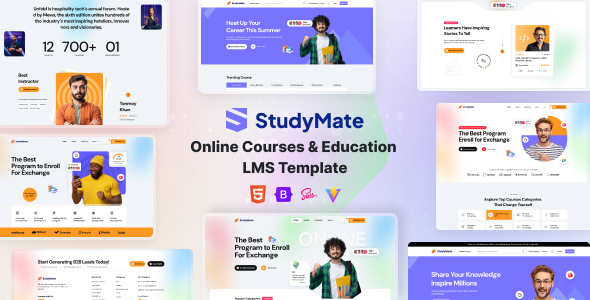
StudyMate is an HTML template for online course platforms and educational websites. It's built for agencies and freelancers needing to quickly launch an education-focused site with standard LMS features.
StudyMate: A Practical HTML Template for Online Education Websites
This is an HTML template designed specifically for online learning platforms, coaching centers, and course marketplaces. Think of it as a pre-built shell for an education website that you can then integrate into your preferred backend system or CMS. It’s not a standalone WordPress theme or a SaaS product; it’s the front-end structure.
Who This StudyMate Template is For (and Who Should Look Elsewhere)
If you’re an agency or a freelancer who frequently builds websites for educational institutions, online course creators, or similar businesses, StudyMate can be a time-saver. It provides a solid foundation for common features like course listings, individual course pages, instructor profiles, and basic event management. The inclusion of eCommerce pages means you can also handle direct sales of courses.
However, this template is not for you if you need a fully functional, out-of-the-box learning management system with complex backend features like student progress tracking, quiz grading, or advanced user role management. It’s a front-end kit, so all that logic would need to be built or integrated separately. If you’re looking for a complete WordPress LMS plugin or a hosted solution, this isn't it.
Solving the "Boilerplate" Problem for Education Sites
Building an education website from scratch involves a lot of repetitive design and structural work. You need layouts for course catalogs, detailed course pages, instructor bios, and registration forms. StudyMate tackles this by providing pre-designed sections and pages for these common elements. This significantly cuts down on the time spent on initial styling and layout, allowing you to focus on the unique aspects of your client's offering or the backend integration.
For example, setting up multiple variations of course listing pages, which is a common requirement for different course types or categories, is handled here. This saves hours of work that would otherwise be spent on CSS and HTML structure for different grid or list layouts. The inclusion of basic cart and checkout pages also means you don't have to reinvent the wheel for simple course sales funnels.
Layouts and Components: What You Actually Get
StudyMate comes with four distinct homepage variations, each catering to a slightly different educational niche. This is useful for presenting different initial impressions, whether it's a marketplace feel or a more institutional approach. Beyond the homepages, the template includes all the essential inner pages you'd expect for an LMS. This includes various styles for displaying courses, detailed single course pages, instructor profiles, blog layouts, event pages, and the necessary sign-in/sign-up forms.
The template is built on Bootstrap, which is a standard framework. This means developers familiar with Bootstrap will find the grid system and components easy to work with. The code is organized into partials and layouts, a common practice that makes it easier to manage and reuse sections of the design across the site. This modular approach is a good sign for maintainability.
Developer Experience and Code Structure
From a developer's perspective, the code quality here appears to be standard for a well-made HTML template. It uses semantic HTML5, which is good for accessibility and SEO. The files are organized logically, making it easier to locate and modify specific sections. When we tested the kit on a demo site, changing a primary color or adjusting a layout felt straightforward, thanks to the Bootstrap foundation and the organized CSS.
The template is also designed with performance in mind. While specific metrics depend on your implementation, the clean structure and optimized assets contribute to faster loading times. This is crucial for user experience and can positively impact search engine rankings, especially for educational sites where engagement is key. The developers mention cross-browser compatibility, which is standard but important to confirm in practice.
Responsiveness and Device Behavior
The template is built with a mobile-first approach, meaning it's designed to look and function well on smaller screens first, then scale up for larger devices. This is the industry standard now, and it’s essential for educational platforms that are often accessed on tablets and phones. The layouts adapt without obvious glitches, and navigation on mobile devices is functional, which is a relief compared to some templates that feel like an afterthought on smaller screens.
SEO Readiness and Markup
StudyMate includes SEO-friendly markup, which is a good starting point for any website. The semantic HTML5 structure provides a clean foundation for search engines to crawl and understand your content. While the template itself won't magically rank your courses, it avoids common pitfalls like overly complex JavaScript-driven content rendering for core pages, which can sometimes hinder indexing. It’s built to integrate well with backend systems that handle the actual content management and SEO optimization.
Final Thoughts: A Solid Foundation for Education Projects
StudyMate is a practical choice if you need a pre-built front-end for an online education platform and want to avoid starting from scratch. It offers a good set of standard LMS pages and features, built on familiar technologies like Bootstrap. It’s a smart investment for agencies and freelancers looking to speed up their development workflow for education-focused projects, especially if you're comfortable integrating an HTML template into your chosen backend or CMS. It’s not a magic bullet, but it’s a solid, well-structured starting point that saves significant time on initial design and layout work.
FAQ
Is StudyMate a WordPress theme or a standalone system?StudyMate is an HTML template, meaning it provides the front-end code. It is not a WordPress theme or a complete, hosted LMS system; it needs to be integrated into a backend or CMS.
Can I use this template for a niche like vocational training or online tutoring?Yes, the template is flexible enough to be adapted for various educational niches, including vocational training or online tutoring, due to its standard LMS page structure.
How easy is it to customize the look and feel beyond basic colors?Customization beyond basic colors is achievable. The template uses Bootstrap and a modular structure, which are standard for web development, allowing for modifications if you have development skills.
Does this template handle student enrollment and progress tracking features?No, StudyMate provides the front-end design for course pages and listings. Features like student enrollment and progress tracking are backend functionalities that you would need to implement or integrate separately.