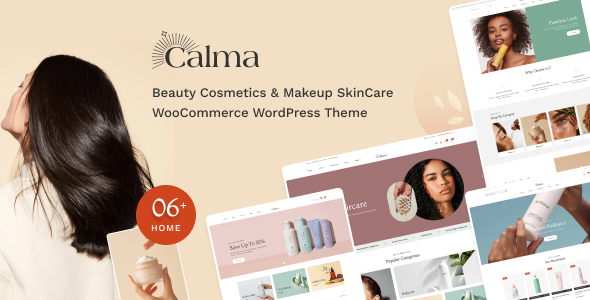
Calma is a WooCommerce WordPress theme designed for beauty, cosmetics, and skincare stores, offering multiple demos and Elementor integration for easier site building. It's a good option for small to medium-sized online beauty businesses looking for a quick setup.
Calma: A Quick Look for Beauty E-commerce
Calma is a WooCommerce theme aimed squarely at the beauty, cosmetics, and skincare market. It comes with several pre-built demo sites, which can save a good chunk of time when you’re trying to get a new online store up and running. Built with Elementor, it offers a visual drag-and-drop approach to customization, which is standard for many themes these days.
Getting Your Beauty Store Online Fast
The main draw here is the speed to market. If you need to launch a functional beauty e-commerce site without a lot of custom coding, Calma delivers. The inclusion of multiple homepage layouts and pre-designed inner pages means you can often mix and match elements to create something that looks distinct enough for your brand. For businesses selling makeup, skincare, or other beauty products, this theme offers a solid foundation.
We found the theme’s approach to product display to be quite effective for the beauty niche. It highlights:
- Product categorization that feels smooth: This helps customers navigate through various product types like serums, foundations, or lipsticks without feeling overwhelmed.
- Components to highlight special products: The banner sliders and featured product widgets are useful for promoting new arrivals or bestsellers, a common tactic in beauty marketing.
- Extensive search functionality: For a beauty store with many shades, sizes, and product variations, the ability for customers to search by category, price, brand, and custom specifications is crucial for finding the right item.
WooCommerce and Multi-Vendor Integration
As a WooCommerce theme, Calma integrates well with the core e-commerce functionalities. It also boasts compatibility with popular multi-vendor plugins like Dokan and WCFM Marketplace. This means if you plan to build a platform where multiple sellers can offer their beauty products, Calma can handle that setup. This is a significant workflow advantage for those looking to create a curated marketplace rather than just a single brand store.
While it states compatibility, it's worth noting that managing multi-vendor specific properties will still be handled within the respective plugin's interface, not directly through the theme’s options. This is a standard limitation across most themes in this regard.
Real-World Workflow Considerations
From a developer's perspective, the CSS organization is fairly standard, using Bootstrap as its base. This makes it somewhat predictable to work with for those familiar with the framework. The inclusion of Elementor means most styling changes will be done visually, which is great for non-developers. However, for deeper, more complex customizations that go beyond Elementor’s capabilities, you’ll be digging into the theme’s specific SASS architecture, which is well-structured but requires familiarity with the build process.
We appreciated the effort put into the mobile menu experience. It’s clean and functional, which is vital for beauty product browsing on the go. The theme also adheres to standard accessibility practices, ensuring that elements like product images have proper alt text, which is good for SEO and user experience.
Areas Where Calma is Just Standard
While Calma offers a lot, some features are now standard for most premium themes. The "responsive design," "SEO optimized," and "unlimited colors" are expected. The theme doesn’t necessarily reinvent the wheel in these areas, but it implements them competently. For those seeking a truly unique design that breaks away from typical beauty store aesthetics, you might find yourself needing to do more extensive custom work.
One area that feels a bit standard is the sheer volume of included shortcodes and widgets. While this offers choice, it can also lead to a bit of bloat if you're not using them all. It’s a common trade-off: more options, but potentially more to manage and a slightly larger file size.
Final Thoughts on Calma for Beauty Stores
Calma is a practical choice for anyone needing to build a beauty, cosmetics, or skincare WooCommerce store quickly. It streamlines the setup process with pre-built demos and Elementor integration, and its multi-vendor compatibility is a strong point for marketplace builders. While it doesn't offer groundbreaking features beyond the niche, it competently delivers what’s expected for a beauty e-commerce website template.
ThemeSparkle Expert Score
Overall Score: 7.5 / 10
- Niche Specificity: 8/10. The theme is clearly tailored for beauty and cosmetics stores, with appropriate demo content and product display options.
- Visual Standards & Aesthetics: 7/10. The designs are clean and fit the general aesthetic expectations for beauty e-commerce, though they don't push creative boundaries.
- Ease of Setup: 8/10. With Elementor integration and one-click demo import, getting a basic site up is straightforward.
- Customization Flexibility: 7/10. Elementor Provides good visual customization, but deeper code-level changes might require more effort than some other frameworks.
FAQ
Can Calma be used for a general online store?
While designed for beauty products, Calma's WooCommerce foundation means it can be adapted for other types of online stores with some content and styling adjustments.
How easy is it to update product information with Calma?
Product updates are managed through WooCommerce and Elementor's interface, which is generally straightforward for adding descriptions, prices, and images.
Does Calma include features for product variations like color swatches?
Yes, Calma supports product variable swatches for colors, sizes, and images, which is essential for beauty products with multiple options.
Is the theme compatible with the latest version of WordPress and WooCommerce?
Themes from reputable sources are generally updated to support the latest versions of WordPress and WooCommerce, but it's always good to check the item's update history.