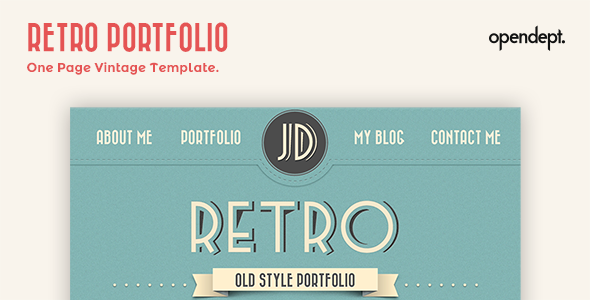
Retro Portfolio: A one-page HTML5 template with vintage graphics and animations, perfect for creatives and freelancers needing a quick online presence. Get a distinct look without extensive coding.
Retro Portfolio: A Niche HTML5 Template for Vintage Online Showcases
This is a straightforward HTML5 template designed for individuals or small agencies looking for a distinct, vintage-style online portfolio. It’s built as a single-page site with pre-defined sections for showcasing work, writing about yourself, and a blog. If you’re aiming for a specific aesthetic and don’t need a complex backend, this template offers a starting point.
Who This Vintage Portfolio Template is For (and Who Should Look Elsewhere)
This template is best suited for graphic designers, illustrators, photographers, or any creative professional who needs a simple, visually striking online portfolio quickly. Freelancers or small studios wanting to establish an immediate online presence with a unique retro feel will find value here. It's ideal for those who understand basic HTML and CSS or have someone who can make minor adjustments.
However, if you’re building a large-scale e-commerce store, a complex membership site, or require extensive custom functionality beyond what’s presented, this template will not meet your needs. It’s not built for dynamic content management systems or advanced integrations. Those needing a modern, minimalist look should also consider other options.
Showcasing Creative Work with a Retro Flair
The core strength of Retro Portfolio lies in its specific design approach. It leans heavily on custom graphic elements and animations to create a distinct vintage vibe. This isn't a generic template; it aims for a specific artistic impression, which can be a significant time-saver if that’s the look you’re after. The inclusion of a Nivo Slider in the home section is a standard feature for showcasing multiple images or key messages without needing to code the slider yourself.
The portfolio section uses jQuery filters, a common and effective way to organize and display project thumbnails. This makes it easy for visitors to sort through your work by category, a practical feature for any creative portfolio. The overall goal here is to present your work attractively with minimal fuss.
Essential Sections for a Personal or Small Business Site
The template is structured into five main sections, covering the essentials for a personal website: Home, About Me, Portfolio, Blog, and Contact. This single-page layout is a popular choice for simplifying navigation and keeping visitors engaged on one scrollable page. The inclusion of a blog section means you can share insights, updates, or process work directly within your portfolio, which is good for content marketing and SEO.
The contact section includes a functional contact form, which is a standard but crucial element for potential clients to reach out. While not explicitly stated, the underlying structure should support basic semantic accessibility practices, which is important for search engines and users with disabilities.
Developer Experience and Code Considerations
Retro Portfolio is built with HTML5 and CSS3, adhering to modern web standards. The inclusion of PSD files is a thoughtful addition, allowing designers to tweak the original graphics before implementation. The use of jQuery for the Nivo Slider and portfolio filters is a common approach that most developers are familiar with, making customization relatively straightforward if you have basic jQuery knowledge.
In our experience with similar templates, the CSS organization can vary. For this template, expect standard CSS files that are generally manageable. The primary benefit here is that you're not starting from scratch, saving significant time on initial styling and layout setup, especially when compared to building a similar vintage-style site from the ground up. This template is a good option for quickly setting up a website for a photography business or a personal artist website.
Responsiveness and Browser Compatibility
The template is advertised as cross-browser compatible. This means it’s designed to look and function consistently across different web browsers like Chrome, Firefox, Safari, and Edge. While specific details on its performance on various devices aren't provided, most modern HTML5 templates aim for a degree of responsiveness. It’s always wise to test it on your own devices to ensure it meets your expectations for mobile and tablet viewing, as this is critical for user experience and search engine rankings.
SEO Readiness for Creative Portfolios
With its HTML5 structure and semantic elements, Retro Portfolio provides a solid foundation for SEO. Clean code and logical content organization are key for search engines to understand and index your site. The inclusion of a blog section further aids in SEO by allowing you to publish fresh content regularly, which search engines favor. While the template itself doesn't guarantee high rankings, it offers the technical basis for good on-page SEO practices.
A Practical Choice for a Specific Aesthetic
Retro Portfolio is a practical choice if you need a visually distinct, vintage-themed portfolio without a significant development investment. It solves the problem of quickly getting a niche-specific online presence up and running for creatives. While it lacks the flexibility of a CMS, its focused feature set makes it a smart buy for its intended purpose, saving considerable time on design and initial setup compared to custom builds. It’s a solid starting point for anyone aiming for that specific retro look.
FAQ
Is this template suitable for an online store?No, this template is designed as a portfolio and blog site. It does not include built-in e-commerce functionality.
Can I easily change the colors and fonts?Yes, as it's an HTML/CSS template, you can modify colors and fonts by editing the CSS files, provided you have basic web development knowledge.
Does the template come with a content management system?This is a static HTML template, meaning it does not come with a content management system like WordPress. Content updates require direct editing of the HTML files.
What is the benefit of having PSD files included?The PSD files allow you to edit the original design elements, such as logos or custom graphics, in Photoshop before implementing them into the HTML template.