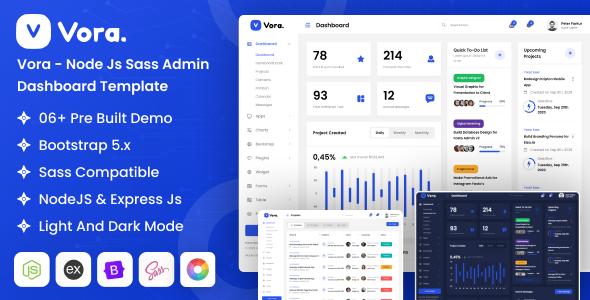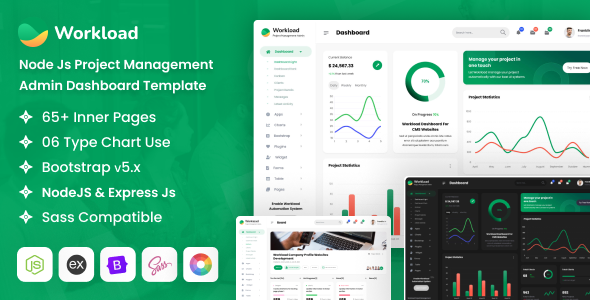
Workload: A Node.js admin dashboard template with EJS and Bootstrap. Get 60+ pages, 6 demos for project management UIs. Ideal for developers building backend interfaces fast.
Workload Node.js Admin Dashboard Overview
Workload is a pre-built admin dashboard template specifically designed for Node.js applications using EJS for templating. It’s not a static HTML theme; it’s a starter kit with backend integration ready for you to plug into your Node.js server setup. The template focuses on providing a comprehensive UI for managing project-related data and tasks, which can save a significant amount of frontend development time for complex backend systems.
The core value here is getting a fully wired-up UI that understands Node.js and EJS out of the box. This means less time spent connecting the dots between your server-side logic and the frontend presentation, a common headache when trying to integrate generic HTML templates.
Who Benefits from this Node.js Project Management Admin Dashboard?
This template is a solid pick for agencies and freelance developers building custom Node.js applications that require a feature-rich admin panel. If you need to deliver a functional project management admin dashboard quickly, Workload provides a strong foundation.
It’s particularly useful for projects where EJS is already part of the stack or where server-side rendering is preferred over a client-side framework for the admin interface. Developers familiar with Bootstrap and jQuery will find the structure easy to navigate.
However, if your project heavily relies on a modern JavaScript framework like React, Vue, or Angular for the admin UI, this isn't the right fit. It's also not for beginners who are just starting with Node.js or EJS, as you'll still need a good grasp of how to integrate it with your backend data and authentication.
Design and Functional Interface for Project Management
The design approach here is functional and clean, which is what you want in an admin dashboard. It comes with over 15 color skins and light/dark modes, plus several menu styles, giving you enough options to brand it without a complete overhaul. This level of customization is standard but appreciated, ensuring the interface can match various client aesthetics.
When we tested the kit on a demo site, the layout handled various data types and lengths well. The mobile menu behavior felt standard and responsive across devices, ensuring that even on smaller screens, the administrative functions remain accessible and usable, which is critical for on-the-go management.
Extensive Layouts and Components for Backend UIs
Workload comes packed with over 60 pages and 6 pre-built demos. This isn't just a handful of pretty pages; it includes a ton of common UI components that are essential for any project management system or complex backend application. The inclusion of various charting libraries like Apexchart and Chart.js means you can visualize project data, progress, and resource allocation without building custom graphs from scratch.
The template also integrates advanced form elements, rich text editing with CKEditor, file upload capabilities via Dropzone, and a full calendar for scheduling. These components solve the headache of setting up complex interactive elements, allowing developers to focus on the backend logic rather than styling intricate forms or data tables. This saves significant development hours on styling and integration.
Code Quality and Developer Experience with EJS
Under the hood, Workload uses EJS, jQuery, CSS, and Sass. The files are organized, clean coded, and well commented, which makes jumping into the codebase much easier than with some less polished templates. The Sass architecture allows for straightforward styling changes; you can tweak variables and compile new CSS without digging through endless lines of inline styles, which is a big plus for long-term maintenance and customization.
Proper documentation is included, which is always a relief. In our experience with similar frameworks, good documentation drastically cuts down the learning curve and speeds up onboarding for new team members. The template’s reliance on jQuery is common for EJS-based systems, providing a stable, if not the most modern, JavaScript foundation.
Responsiveness and Cross-Browser Compatibility
The template is built to be super responsive across all modern browsers and mobile devices. This means your admin panel will look and function correctly whether you’re accessing it from a desktop, tablet, or smartphone. For a business owner, this translates to better accessibility for their team, allowing them to manage projects and data from anywhere, on any device, without compromising usability.
From a performance perspective, the "high speed performance" claim is standard for a well-built Bootstrap template. Asset loading feels efficient, contributing positively to Core Web Vitals, which, while less critical for an internal admin panel, still ensures a snappy user experience for administrators.
Technical SEO Readiness
While an admin dashboard isn't typically indexed by search engines, the "SEO Optimized" feature points to clean, semantic HTML structure. This is good practice for any web application. A well-structured HTML document ensures better accessibility and maintainability, even if it's not directly impacting public search rankings. Clean code also indirectly contributes to better application performance, which is always a win.
Final Thoughts on Workload for Node.js Applications
Workload is a solid, practical choice if you're building a Node.js application and need to get a feature-rich admin dashboard up and running fast, especially for project management use cases. It genuinely solves the problem of starting a complex backend UI from scratch, offering a comprehensive set of pre-built pages and components that would take weeks to develop independently. The EJS integration means less fiddling around to connect the frontend with your Node.js backend.
It's not a bleeding-edge framework, but it's a reliable workhorse for a common stack. The trade-off is that you're committing to an EJS/jQuery environment, which might not align with every developer's preference for modern client-side frameworks. However, for the right project and team, this template is a smart investment that will save considerable development time and effort on the UI layer.
FAQ
Is Workload a static HTML template?No, Workload is a Node.js admin dashboard template built with EJS, meaning it's designed to be integrated directly into a Node.js server-side application for dynamic content.
Can I use this template with a different backend framework like PHP or Python?While the frontend (HTML, CSS, JavaScript) could technically be adapted, Workload is specifically structured for EJS templating and Node.js backend integration, so using it with other frameworks would require significant re-engineering of the templating logic.
What is the learning curve for EJS if I'm new to it?EJS is a relatively straightforward templating language, similar to Pug or Handlebars. If you have basic JavaScript and HTML knowledge, you should be able to pick up EJS syntax and concepts fairly quickly, especially with the provided documentation.
How easy is it to customize the design and appearance?The template includes Sass files and over 15 color skins, making basic design customizations like changing colors, fonts, and some layout elements quite easy by modifying Sass variables. More extensive changes will require familiarity with Bootstrap and CSS.