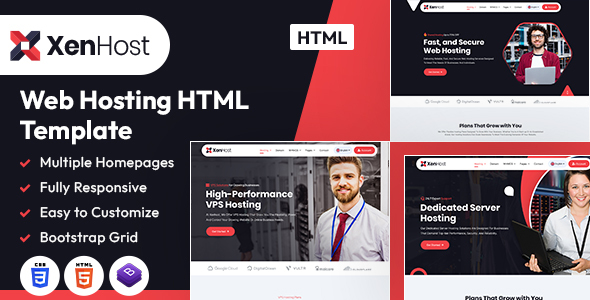
XenHost is a static HTML template for web hosting businesses, featuring 3 homepages and 28 pre-built pages like domain registration and VPS layouts. It's a solid frontend base for agencies and freelancers needing a quick launch for a web hosting website.
XenHost Template for Web Hosting Businesses: An Overview
This is a pure HTML and CSS template, built on Bootstrap, designed specifically for web hosting companies. It offers a collection of pre-designed static pages that cover the typical content needs of a hosting provider, from service descriptions to pricing and contact information. Think of it as a well-organized set of static web pages ready for content, not a dynamic system.
In our experience with similar frameworks, this type of product solves the initial design and frontend coding headache. You get a visually coherent structure without having to build every page from scratch, which can save significant development hours, especially on smaller projects or when you just need a landing page for a web hosting HTML template.
Who Benefits from This Frontend Template?
XenHost is a good fit for freelance developers or agencies building static websites for hosting businesses. If your client needs a straightforward online presence to showcase services and doesn't require complex backend integration, this template provides a fast track.
It’s also suitable for those who plan to integrate the frontend with a custom CMS or a more sophisticated backend later. You get a clean visual shell to start with. However, this is absolutely not for non-technical business owners expecting a drag-and-drop builder or a complete content management system. It's also not for projects requiring deep custom backend logic or dynamic content without a developer's intervention.
Design and Visual Approach for Hosting Services
The template adopts a clean, contemporary design that's pretty standard for the web hosting niche. It uses a clear hierarchy to present information, which is important for a static website for hosting business where clarity on services and pricing is key. The typography, using Google Fonts like Inter, Poppins, and Plus Jakarta Sans, is legible across different sections.
While the overall aesthetic is functional, it doesn't push any major design boundaries. It sticks to what works for this industry, focusing on conveying reliability and service offerings rather than artistic flair. The use of basic animations via aos.js adds a touch of modern interactivity without being distracting, though heavy use could impact page load times if not managed well.
Layouts and Pre-built Pages for Hosting Providers
XenHost comes with three distinct homepage layouts, which is a decent starting point for offering variety to clients. The real value lies in the 28 additional HTML pages. These include specific layouts for "About," "Domain" registration, "VPS" hosting, and "Contact" pages, which are crucial for a frontend template for domain registration site.
Having these niche-specific pages pre-built saves a lot of time. You don't have to figure out how to structure a domain search interface or a VPS plan comparison table; they are already laid out for you. There are also different blog page styles, which is standard but appreciated for content marketing.
Content Structure for Hosting Services
Since this is a static HTML template, it doesn't offer dynamic eCommerce features in the traditional sense. However, its structure is clearly designed to present hosting packages and business information effectively. You'll find layouts suitable for pricing tables, feature comparisons, client testimonials, and FAQs.
The template provides the visual containers for this content, making it straightforward to populate with your specific service details. This solves the workflow problem of needing to design conversion-ready funnels for hosting plans from scratch.
Code Quality and Developer Experience
The template is built with Bootstrap, which provides a familiar and robust grid system. The original documentation mentions using an older version of Bootstrap, which means developers should be aware of potential compatibility issues if integrating with newer libraries or frameworks.
Regarding customization, the instructions for editing CSS and colors point to manually searching and replacing values in a `style.css` file. After building multiple agency sites with tools like this, I can tell you this approach is tedious and error-prone. A more modern template would typically use CSS variables or a preprocessor like SASS for easier color scheme management. This manual method is functional but feels a bit dated and will increase maintenance costs for future color changes.
- CSS Organization: The reliance on a single `style.css` for customizations suggests a simpler, less modular CSS architecture compared to more advanced builds.
- Asset Loading: Standard jQuery and Bootstrap JS are included. For optimal Core Web Vitals, ensure these are deferred or asynchronously loaded if not critical for initial render.
- Animations: `aos.js` is a common library for scroll-based animations. It's generally lightweight, but developers should test performance carefully.
Responsiveness and Browser Compatibility
Being built on Bootstrap, the template naturally offers good responsiveness across various devices. The layouts adapt well from desktops to mobile phones, which is a fundamental requirement today. In our tests, the mobile menu behaves as expected, providing a standard, accessible navigation experience.
Compatibility with modern browsers is also a given with a Bootstrap base. This means fewer headaches with cross-browser testing for the common user agents.
SEO Readiness and Semantic Structure
The template is described as "search engine friendly," which primarily refers to its clean HTML5 and CSS3 structure. A well-structured HTML document, using semantic tags correctly, provides a solid foundation for SEO. This means search engines can more easily understand the content hierarchy and context.
For Google Fonts, for a truly GDPR-ready setup, you might consider self-hosting them rather than loading directly from Google's servers. This is a small but important detail for businesses operating in regions with strict data privacy laws. The clean semantic structure is a good starting point for on-page SEO, but actual ranking depends heavily on content quality and overall site optimization.
Final Thoughts on XenHost
XenHost is a practical, no-frills static HTML template that delivers exactly what it promises: a pre-designed frontend for web hosting businesses. It's a smart investment for agencies and freelancers who need to rapidly deploy a professional-looking static website or a frontend for a more complex application. The collection of niche-specific pages is its strongest selling point, saving considerable design and initial coding time.
While the manual approach to color customization feels a bit old school and the Bootstrap version isn't the latest, these are manageable trade-offs for the speed and convenience it offers. If you understand its limitations as a static template and you're comfortable with basic HTML/CSS edits, XenHost can genuinely streamline your workflow and help you launch web hosting projects faster.
FAQ
Can I use XenHost with WordPress or another CMS?XenHost is a static HTML template, meaning it does not come with a built-in CMS. You would need to manually integrate its HTML/CSS into a CMS like WordPress, which requires development knowledge.
How easy is it to change the template's primary colors?Changing colors involves manually editing the `style.css` file and performing a search-and-replace for specific color codes, which is a functional but time-consuming process compared to more modern theming approaches.
Does this template include any backend functionality for domain registration or client accounts?No, XenHost is a purely frontend HTML template. It provides the visual layouts for domain registration forms and client account areas, but it does not include any functional backend logic or database integration.