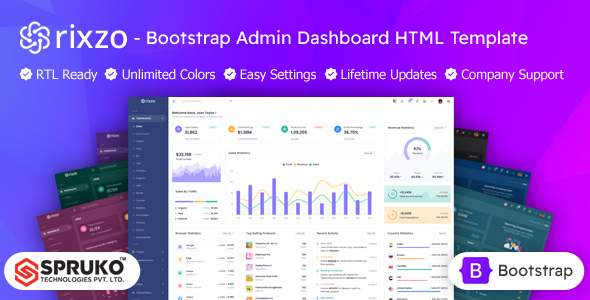
Rixzo is a static HTML Bootstrap admin dashboard template built with Sass and Gulp, offering 180+ pages and 30+ plugins. It's ideal for developers needing a quick frontend start for custom backend applications.
Rixzo: A Frontend Starter for Admin Interfaces
This Rixzo HTML Bootstrap admin dashboard template provides a comprehensive set of pre-built UI components and pages for creating admin panels. Think of it as a robust frontend kit that handles the visual heavy lifting, letting you focus on integrating your specific backend logic and data. It’s built on Bootstrap, so if you're already familiar with that framework, you’ll feel right at home.
The core idea here is to give you a head start. Instead of designing every form, table, or chart from scratch, you get a ready-made library. This approach solves the common workflow problem of spending too much development time on repetitive UI tasks, allowing agencies and freelancers to deliver polished admin interfaces faster.
Who Benefits from this Admin Dashboard UI Kit?
This static HTML Bootstrap admin dashboard is definitely for developers, agencies, and freelancers who need to spin up custom admin interfaces quickly. If you’re building a bespoke web application with its own backend (like Node, Python, PHP, or .NET) and need a solid, responsive UI without starting from zero, Rixzo fits the bill. It's a great asset for projects where you need to present data, manage users, or handle various operational tasks.
However, it’s important to understand who this is not for. This isn't a full-stack solution; there's no backend logic included. If you’re looking for an all-in-one content management system or a ready-to-deploy application, this isn't it. You'll need development skills to integrate your data and make the forms and interactive elements functional. It’s a frontend template for custom backend projects.
Practical Design and Component Library Insights
Rixzo comes packed with a huge number of pages and components. You get 16 different dashboard variations right out of the box, covering common needs like sales, analytics, and CRM. The sheer volume means you'll likely find a starting point for almost any internal tool you're building.
The design itself is clean and follows modern UI trends without being overly flashy. It uses Google Fonts and multiple icon sets, which is standard practice for most templates. What stands out are the "switcher options" for layouts and themes – things like LTR/RTL, vertical/horizontal navigation, and various menu/header styles. These offer practical flexibility for tailoring the user experience to different client requirements, saving significant time compared to hand-coding variations.
- Includes a comprehensive set of 180+ HTML pages, providing a wide range of layouts for various admin tasks.
- Offers 16 distinct dashboard variations, giving you a head start for different niches like e-commerce or project management.
- Features extensive customization options for layouts, colors, and navigation, which reduces manual CSS adjustments.
Developer Experience: Code Quality and Setup
From a developer's perspective, this admin panel UI kit is built with Bootstrap and uses Sass for its styling, which is a huge plus. This means the CSS is organized, maintainable, and easy to customize via variables. We've seen countless templates with messy styles, so proper Sass architecture is always appreciated. It compiles with Gulp and Esbuild, indicating a modern asset pipeline that helps with performance.
A significant advantage mentioned is the removal of jQuery dependencies. In our experience with similar frameworks, this generally translates to a lighter codebase and better performance, which directly impacts Core Web Vitals scores and overall user experience. This means faster load times for your admin users, which business owners will appreciate.
- Uses Sass for structured CSS, making styling changes straightforward and maintainable.
- Built with Gulp and Esbuild, indicating a modern and efficient build process.
- No jQuery dependency for improved performance and a lighter JavaScript footprint.
- Includes well-commented code, which simplifies understanding and future modifications.
SEO Readiness and Accessibility Considerations
While an admin dashboard isn't typically a public-facing site needing heavy SEO, having a clean, semantic HTML structure is still important for maintainability. Rixzo claims W3C validation and clean code, which are good indicators of a solid foundation. This means less debugging later and a more accessible product overall.
The responsive design ensures a consistent experience across desktops, tablets, and smartphones. This is standard for any modern web template, but it's crucial for an admin panel where users might need to access data on the go. Cross-browser compatibility is also listed, which is expected but still worth confirming to avoid unexpected rendering issues.
Final Thoughts on Rixzo for Your Admin Panel Project
After building multiple agency sites with tools like this, Rixzo feels like a genuinely useful asset for specific scenarios. It's not a magical all-in-one solution, but it excels at what it promises: providing a robust, well-structured frontend for an admin dashboard. The sheer volume of pages and components means you're likely to find what you need, and the use of Sass, Gulp, and no jQuery is a strong indicator of a developer-friendly and performant base.
The main trade-off is that you're getting a static HTML template, meaning all backend integration is on you. This isn't a flaw, but a design choice offering maximum flexibility. If your team has the backend expertise and needs to save significant time on frontend UI development for an internal tool or client project, investing in Rixzo could easily save dozens of hours, making it a smart purchase to streamline your workflow and deliver projects faster.
FAQ
Is Rixzo a full-stack application with a backend included?No, Rixzo is a static HTML Bootstrap admin dashboard template. It provides only the frontend UI and requires you to integrate your own backend logic and database.
How easy is it to customize the design and colors?It's quite straightforward due to its Sass architecture. You can modify variables in the Sass files to change colors, fonts, and other design aspects, which then compile into your CSS.
What's the practical benefit of Rixzo not using jQuery?The absence of jQuery generally leads to a lighter JavaScript footprint, faster page load times, and improved overall performance, which is beneficial for the user experience and potentially Core Web Vitals.
Can I use Rixzo for a complex enterprise-level application?Yes, you can use Rixzo as the frontend foundation for a complex enterprise application. Its extensive component library and clean code provide a solid base, but you will need to build out all the specific backend business logic and integrations yourself.