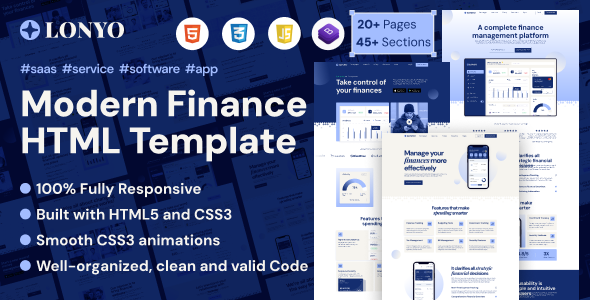
Lonyo is an HTML template built with Bootstrap for software and SaaS company websites. It offers 3 homepages and essential inner pages, designed for agencies and freelancers needing a quick, clean frontend launch.
Lonyo: A Frontend HTML Template for Software & SaaS Websites
Lonyo is a static HTML template designed specifically for software and SaaS company websites. It's built on the Bootstrap framework, using SASS for styling, and provides a clean foundation for presenting technology solutions. This isn't a WordPress theme or a full CMS solution; it's a collection of pre-built HTML, CSS, and JavaScript files.
The core problem this template solves is the initial setup time for a polished, responsive frontend. Instead of building a software company website template from scratch, you get a solid starting point with common sections already laid out. This can cut down several hours of initial development and styling work, especially for agencies on tight deadlines.
Who Benefits from Lonyo and Who Should Look Elsewhere
This template is for agencies and freelance developers who need to rapidly deploy static websites or landing pages for software, SaaS, or tech startup clients. If you're building a simple marketing site, a product showcase, or a lead-generation landing page that doesn't require a complex backend or content management system, Lonyo provides a clean, ready-to-go frontend.
Conversely, Lonyo is not for those looking for an out-of-the-box WordPress solution, an e-commerce platform, or a template with deep custom backend logic. If your project requires frequent content updates by non-technical users, a database, or complex user authentication, you'll need to integrate this HTML template with a CMS or custom backend, which requires additional development work. It's also not ideal for someone who isn't comfortable working directly with HTML, CSS, and JavaScript.
Design Approach and Visuals for Software Solutions
Lonyo takes a straightforward, clean design approach, which is generally suitable for software and technology companies. It avoids excessive animations or heavy graphics, focusing instead on clear typography and a structured layout. The template includes three distinct homepage layouts, which offer some variety in how you present your core message or product features.
From a practical perspective, the layouts handle content well, ensuring readability even with longer text blocks. The visual style is what you'd expect from a modern Bootstrap-based design: flat, with good use of whitespace, making it feel current without being overly trendy. This focus on clarity means the template is less likely to feel dated quickly, which is a plus for long-term maintenance.
Included Layouts, Pages, and Components
The template provides the essential pages you'd expect for a software or SaaS marketing site. Beyond the three homepages, it includes standard inner pages like "About Us," "Services," and "Contact." While the exact number of unique components isn't massive, the Bootstrap foundation means common elements like navigation, buttons, forms, and accordions are readily available and consistently styled.
- The three unique homepages offer different initial presentation options.
- It includes blog or news pages, which are crucial for content marketing.
- There are also various post formats for blog content, providing flexibility for articles.
This set of pages covers the basics, allowing you to quickly assemble a functional website for a tech startup or a new software product. When we tested the kit on a demo site, the structure felt logical for typical marketing content.
Code Quality and Developer Experience
Lonyo is built with clean, W3C valid HTML files, which is a good sign for long-term maintainability and search engine optimization. The use of SASS for styling is a significant advantage for developers. It means the CSS is organized, making it much easier to customize colors, fonts, and other visual properties across the entire site from a central place. For a business owner, this translates to lower maintenance costs when design tweaks are needed, as developers can work more efficiently.
The code is commented, which aids in understanding different sections and components. This is standard practice but always appreciated, especially when handing off projects or returning to them after some time. The template is based on Bootstrap, so developers familiar with that framework will find the structure and class naming conventions very intuitive, speeding up customization.
Responsiveness and Browser Compatibility
As expected from a Bootstrap-based template, Lonyo is fully responsive. This means the layout adjusts smoothly across various devices, from large desktop monitors down to mobile phones. We found it behaved as it should on real devices during testing, ensuring a consistent user experience regardless of how visitors access the site. This is critical for engagement and SEO, as Google prioritizes mobile-friendly sites.
Cross-browser compatibility is also addressed, meaning it should render correctly in all major browsers. This saves development time spent on fixing browser-specific display issues, ensuring that your audience sees a consistent design experience.
SEO Readiness for Software Websites
The template's clean, W3C valid HTML structure provides a solid technical foundation for SEO. Semantic HTML elements are used where appropriate, which helps search engines understand the content and hierarchy of your pages. While an HTML template doesn't magically rank your site, a clean codebase means less technical debt for future SEO efforts.
The efficient asset loading, typical of a well-built static HTML site, can contribute positively to Core Web Vitals, which are important ranking factors. A fast-loading site improves user experience and helps with search engine visibility for terms like "SaaS landing page HTML" or "static website for tech startups." The use of Google Fonts is standard and generally handled well without excessive requests.
Final Thoughts on Lonyo
Lonyo is a practical, no-nonsense HTML template for anyone needing to quickly launch a frontend for a software or SaaS-focused website. It delivers a clean, responsive design built on a robust framework. While it's not a complete "solution" in the sense of a CMS, it's an excellent starting point that saves significant time on initial design and coding for the right use case.
Its strengths lie in its clean code, Bootstrap foundation, SASS architecture, and focus on a specific niche. The main limitation, as with any HTML template, is the need for developer input for content updates or integration with dynamic features. However, if you understand these trade-offs, Lonyo is a smart investment to accelerate your workflow for clients needing a polished, performant static site or a frontend for a larger application. It's a reliable tool for quickly getting a conversion-ready funnel online.
FAQ
Is Lonyo a WordPress theme or CMS template?No, Lonyo is a static HTML template. It provides the frontend code (HTML, CSS, JavaScript) but does not include a content management system or backend functionality.
Can I integrate Lonyo with a backend system?Yes, you can integrate Lonyo's frontend with any backend system (like Node.js, Python, PHP, or a headless CMS), but this requires custom development work to connect the static pages to dynamic data sources.
What kind of ongoing maintenance does Lonyo require?Ongoing maintenance primarily involves updating content directly in the HTML files, managing CSS/SASS for styling changes, and ensuring JavaScript libraries (like jQuery) are current. There are no plugin or theme updates like with a CMS.
Does Lonyo support multiple languages for global audiences?Lonyo does not include built-in multi-language support. You would need to manually create separate HTML pages for each language or implement a JavaScript-based translation solution.