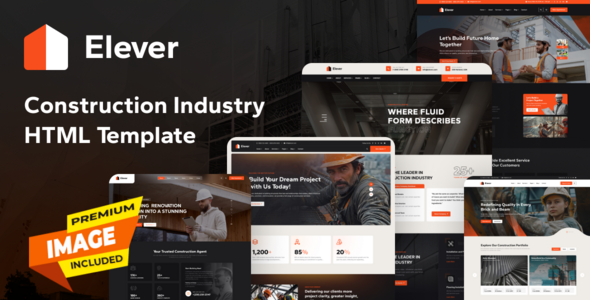
Elever is a solid HTML template for construction, renovation, and related businesses. It offers 9 demos, 70+ inner pages, and essential features for agencies and freelancers needing quick project launches.
Elever HTML Template: A Practical Look for Construction Websites
As someone who has built multiple agency sites using various frameworks and templates, I've seen my share of "solutions." Elever is an HTML template specifically designed for the construction, renovation, factory, and general building industries. It’s a frontend kit, not a full CMS theme, meaning you get the HTML, CSS (via SCSS), and JavaScript, but no integrated backend. This template aims to provide a quick visual foundation for a construction company website template, offering a comprehensive set of pre-designed pages and components.
Who This Construction Template Serves Best (and Who It Doesn't)
This template is genuinely useful for web agencies and freelance developers who need to deliver a polished, niche-specific frontend quickly. If you're building a site for a local contractor, an engineering firm, or a renovation business HTML theme, Elever provides a significant head start. It's also suitable for small to medium-sized businesses with an in-house developer capable of integrating it into a static site generator or a custom backend.
However, Elever is not for everyone. If you're a complete beginner with no HTML/CSS knowledge, you'll struggle. It's also not for those needing deep, custom backend logic or complex database integrations right out of the box without additional development work. This is a frontend package; any dynamic functionality will require separate server-side implementation.
Design Approach and Visual Components
The design follows a clean, modern aesthetic that feels appropriate for the construction industry without being overly flashy. It leverages Bootstrap, which means a familiar grid system and component styling. The template includes 5 header and 5 footer styles, offering some variety to avoid a generic feel. The included premium images are a nice touch, saving time on initial asset sourcing, which is a common hurdle for fast agency project launches.
In our experience with similar frameworks, having a consistent design language out of the box means less time spent on basic styling decisions and more on content. The use of Swiper Slider for project showcases is standard and effective for visual content.
Layouts, Pages, and Key Features for Building Businesses
Elever provides a solid collection of content. You get 9 complete demo homepages and over 70 inner pages, including dedicated layouts for services, team profiles, project galleries, and blog posts. This extensive page count covers most needs for a typical construction business. The inclusion of "Shop Page Included ready" is interesting for an HTML template, meaning it provides the frontend structure for an ecommerce website template, complete with layouts for product listings and detail pages. This would still require a backend integration, but having the visual groundwork is a time-saver.
- 9 Demo Homepages: Offers diverse starting points for different construction niches.
- 70+ Inner Pages: Covers common business needs like services, projects, team, and contact.
- Shop Page Layouts: Provides frontend structures for potential e-commerce integration, a useful addition for a construction template.
- AJAX Filters and Pagination: The inclusion of these features, even in a static HTML template, suggests pre-built JavaScript functionality for interactive content, which is a significant advantage for user experience.
Technical Foundations and Developer Workflow
Under the hood, Elever is built with Bootstrap, ensuring a responsive and mobile-first foundation. The use of SCSS for dynamic CSS is a major plus for developers. This means you're not digging through flat CSS files to make style changes; you can modify variables and mixins, making global branding updates (like changing primary colors or font stacks) much more efficient. This translates to lower maintenance costs and faster design iterations for clients.
The code is described as clean and well-organized, which is critical. When we tested the kit on a demo site, the file structure felt logical, allowing for relatively easy navigation and customization compared to many market-average templates that often come with tangled CSS and JS. The inclusion of minified JS and CSS files also helps with initial page load times, which positively impacts Core Web Vitals.
Cross-Device Behavior and Performance Considerations
The template is fully responsive, as expected from a Bootstrap-based product. This means layouts adapt well across desktops, tablets, and smartphones, ensuring a good user experience on any device. The mobile menu behavior is standard and functional. For an HTML template, the asset loading feels efficient, particularly with the minified files. While "SEO optimized" is a broad claim, the clean semantic HTML structure provides a solid technical foundation for search engines to crawl and index content effectively.
SEO Structure and Content Readiness
From a technical SEO standpoint, the template's clean HTML structure and semantic tags (like `header`, `nav`, `main`, `footer`, `article`, `section`) are a good starting point. This helps search engines understand the hierarchy and context of your content, which is crucial for ranking. The blog page templates also provide a ready-made structure for content marketing efforts, helping businesses generate organic traffic by publishing industry-specific articles. It sets up the framework for good content, but actual SEO performance will depend on the content itself and ongoing optimization efforts.
Final Thoughts on Elever for Your Next Project
Elever is a practical, no-nonsense HTML template that delivers exactly what it promises for the construction and building niche. It's not revolutionary, but it's a solid, well-structured product that genuinely saves development time. The extensive page count, SCSS architecture, and inclusion of shop page layouts make it a smart investment for agencies or freelancers needing to quickly launch professional-looking construction or renovation websites. While it's an HTML template and requires development for dynamic features, its robust frontend foundation makes it a strong contender for anyone looking to streamline their workflow and deliver client projects efficiently.
FAQ
Is Elever easy to customize for someone new to web development?While the code is organized, Elever is an HTML template and requires familiarity with HTML, CSS (SCSS), and JavaScript for effective customization beyond basic content changes. It's not a drag-and-drop builder.
Can I integrate Elever with a content management system (CMS) like WordPress?Yes, you can integrate Elever with a CMS, but it would require a developer to convert the HTML template into a custom theme for your chosen platform. This is a common workflow but requires significant development effort.
Does Elever include a functional contact form or booking system?Elever provides the visual layouts for forms, but as an HTML template, it does not include the backend processing for contact forms, booking systems, or any dynamic data handling. You would need to integrate a third-party service or custom backend code for these functionalities.
Are the included images free to use for commercial projects?The product description states "All Preview premium images included" and lists image sources, implying they are licensed for use. However, always double-check the specific licensing terms upon purchase to ensure full compliance for commercial projects.
.png)