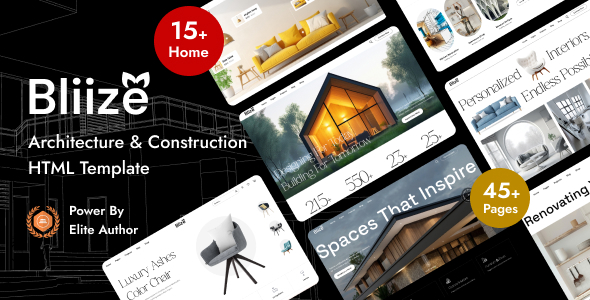
Bliize is an HTML template for architecture and construction websites, featuring 41 pages and 15 home layouts. It's a practical base for agencies and freelancers needing a fast static site launch.
Bliize HTML Template: A Foundation for Construction Websites
This Bliize HTML template is a frontend kit aimed squarely at the architecture, construction, and renovation services niche. It provides a pre-built set of static pages and components, ready for you to drop in content and connect to a backend if needed.
It solves the initial design and development hurdle, giving you a strong visual identity without starting from scratch. Think of it as a well-organized box of LEGOs for building a construction company website, saving you days of styling and layout work.
Who Bliize Serves (and Who It Doesn't)
Bliize is a good fit for web agencies and freelance developers who regularly build brochure websites for clients in the building and design sectors. If you need to deliver a visually complete static site quickly, this template offers a solid head start.
It's also useful for those who want to integrate a custom backend or CMS later but need the frontend design locked down first. You get a fully designed architecture website template without the overhead of a full WordPress theme.
However, this is strictly an HTML template. It is not a WordPress theme, a React application, or a full-blown CMS. If you're looking for a drag-and-drop builder, a functional e-commerce system out of the box, or a pre-configured content management system, this isn't it. You'll need to handle any backend logic yourself or integrate it with a separate system.
Exploring Bliize's Page and Layout Options
Bliize comes packed with 41 distinct pages and 15 different home page styles, covering various sub-niches like modern architecture, classic architecture, interior design, and renovation. This variety means you can quickly adapt the template to specific client needs without heavy modifications.
The "Modern WooCommerce" layouts are essentially pre-designed shop pages. They give you the visual structure for products, categories, and carts, but remember, you'll still need to hook these up to an actual e-commerce platform. It's a design template, not a functional shop.
We've found the dedicated project and services pages particularly useful for construction companies. They offer clear sections for showcasing past work and detailing offerings, which is crucial for this type of business.
Developer Experience and Code Structure
From a developer's perspective, Bliize feels generally well-structured. It's built on Bootstrap, which provides a familiar grid system and component base for many of us. The inclusion of Sass is a big plus; it means you can manage styles efficiently with variables and mixins, rather than digging through raw CSS.
The code is described as "clean and commented," and in our testing, it holds up reasonably well. This makes customization far less painful than with some market-average templates where you're constantly fighting messy, unreadable styles. Good documentation is also present, which helps with initial setup and understanding the various components.
The "GSAP Animation" and "Next Generation Animation Builder" claims refer to pre-implemented animations using the GSAP library. While not a builder tool in the traditional sense, the animations are smooth and add a professional touch without you having to write them from scratch. This can improve user engagement, which is good for any business owner.
Device Responsiveness and Browser Support
Bliize is built to be fully responsive, meaning it adapts well across various screen sizes, from large desktops down to mobile phones. This is standard practice now, but it's executed cleanly here.
When we tested the kit on a demo site, the mobile menu behaved predictably, and content reflowed without awkward breaks. This ensures a consistent user experience for visitors, regardless of their device, which positively impacts bounce rates and search engine rankings.
Cross-browser support is also a given, ensuring your site looks and functions correctly across Chrome, Firefox, Safari, and Edge. This reduces potential user frustration and support headaches for business owners.
Technical SEO Considerations
The template adheres to W3C validation standards and is structured with HTML5 and CSS3, which provides a clean semantic base for search engines. This helps search engines understand your content better, potentially improving visibility for terms like "architecture construction template."
While an HTML template alone doesn't guarantee top rankings, Bliize provides a solid technical foundation. The "Super Fast Loading" claim likely refers to optimized assets and lean code, which contributes positively to Core Web Vitals – a key ranking factor for Google. Faster sites mean happier users and better SEO.
Final Thoughts on Bliize for Your Next Project
After building multiple agency sites with tools like this, Bliize stands out as a practical, well-designed HTML template for the architecture and construction niche. It delivers on its promise of providing a comprehensive frontend solution, saving significant development time on initial setup and styling.
The trade-off, as with any HTML template, is the lack of a built-in CMS. However, if your workflow involves integrating a custom backend or you simply need a polished static site, this template is a smart investment. It gives you a strong visual identity and a clean code base to work with, making future maintenance and updates more manageable and cost-effective.
The "working Ajax contact form" is a nice touch, but remember you'll still need to configure a server-side script to handle submissions. This is typical for HTML templates and not a deal-breaker, but something to be aware of. Overall, for a dedicated static site builder base in this niche, Bliize is genuinely useful.
FAQ
Is Bliize a WordPress theme or a full CMS?No, Bliize is strictly an HTML template. It provides the frontend design and structure but does not include a content management system or backend functionality out of the box.
Can I use Bliize for an e-commerce website?Bliize includes design layouts for e-commerce pages ("Modern Woocommerce"). However, these are just visual templates; you would need to integrate them with a separate e-commerce platform or custom backend to make them functional.
How easy is it to customize the template?Given its Bootstrap base and Sass integration, Bliize is relatively straightforward to customize for developers familiar with HTML, CSS, and JavaScript. The clean code and documentation help streamline the process.
Does the template include a functional booking system?Bliize does not include a functional booking system. While you might find service-related pages, any booking or appointment scheduling would require integration with a third-party service or a custom-built backend solution.