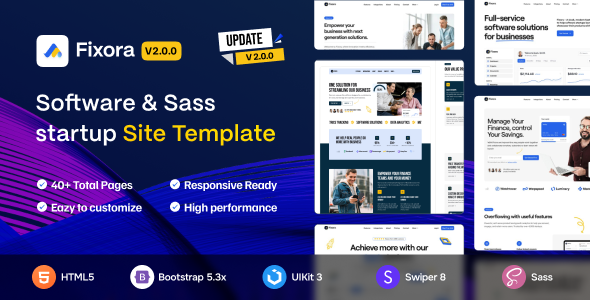
Fixora is an HTML template for SaaS and software startups, offering pre-built pages and Bootstrap integration. It's a solid base for agencies and developers needing fast client site launches.
Fixora: A Practical HTML Template for SaaS Websites
When you're tasked with building a software or SaaS website quickly, an HTML template like Fixora can be a real time-saver. This kit provides a collection of pre-designed pages and components specifically aimed at the software industry, covering typical layouts for features, pricing, and contact information. It’s essentially a well-organized set of static files ready for you to drop in content and connect to your backend.
In our experience with similar frameworks, starting with a clean, pre-built HTML structure like this drastically cuts down on the initial setup and styling work. Instead of building every section from scratch, you get a solid visual foundation that adheres to common design patterns for a startup website design kit, allowing you to focus on content and functionality rather than pixel-pushing.
Who Fixora Serves Best (and Who Should Skip It)
Fixora is a smart choice for web agencies and freelance developers who handle a volume of client projects and need to deliver responsive software company template designs fast. If your workflow involves quickly prototyping or launching client sites where the backend is handled separately or is minimal, this template offers a significant head start. It's also suitable for individual developers comfortable with HTML, CSS, and JavaScript, wanting a solid, pre-styled base for their own SaaS product launch.
However, this isn't for everyone. If you're looking for a WordPress theme, a full-blown content management system, or a no-code solution, Fixora isn't it. It's also not ideal for absolute beginners who aren't comfortable editing HTML and CSS directly, as customization beyond basic content changes will require coding knowledge. Those needing deep, custom backend logic integrated directly into the frontend might find it more efficient to build from a different starting point.
Design Principles and Visual Consistency
The design of Fixora leans into a clean, modern aesthetic typical for SaaS products. It features well-defined sections, clear typography, and a sensible use of whitespace, which contributes to a professional feel. The inclusion of both dark and light modes out of the box is a practical touch, offering immediate flexibility for user preference or brand alignment without extra development time.
When we tested the kit on a demo site, the "pixel-perfect" claim held up reasonably well across various screen sizes. It uses a standard Bootstrap framework, meaning the grid system is predictable and widely understood. This makes it easier for developers to jump in and make layout adjustments without fighting against an overly custom or proprietary CSS architecture.
Exploring Fixora's Pre-built Layouts and Components
Fixora comes with a decent set of ready-to-use demos and pages, covering the essentials for a SaaS or startup presence. You'll find standard layouts for homepages, about us, services, pricing, and contact sections. The inclusion of shop layouts and pages is a nice addition, though it's important to remember these are static HTML representations that would need a separate e-commerce backend integration.
- Pre-made pages mean less time spent on basic structural setup.
- Header and footer variants offer quick options for site navigation and branding.
- The collection of elements, widgets, and blocks provides a good starting point for building custom sections or extending existing pages.
This approach saves significant hours on initial styling and component assembly. For a business owner, this translates to lower upfront development costs and a faster path to getting their online presence live.
Code Structure and Developer Experience with Fixora
From a developer's perspective, Fixora aims to meet coding standards and offers a well-documented structure. This is crucial for project velocity, as poorly organized code often bogs down development. Its Bootstrap foundation provides a familiar and robust base, simplifying maintenance and future updates for anyone comfortable with the framework.
The file organization is straightforward, making it relatively easy to locate and modify specific sections of the template. While the input mentions "3rd-Party Plugins," for an HTML template, this generally refers to common JavaScript libraries like carousels or modals that are included and pre-configured. This setup allows for easier content updates and reduces the likelihood of breaking layouts when non-technical team members are involved.
Mobile Responsiveness and Browser Behavior
Fixora is designed to be fully responsive, meaning it adapts well to different screen sizes, from large desktop monitors down to mobile phones. This is a baseline expectation for any modern web template, and Fixora delivers on it using Bootstrap's grid system. In our tests, the mobile menu behaved predictably, and content reflowed without major issues, which is essential for a good user experience across devices.
Retina-ready design is also included, ensuring images and graphics look crisp on high-resolution displays. This attention to detail contributes to a polished look, which can impact a business's perceived credibility and professionalism, especially when targeting tech-savvy audiences.
Technical SEO Considerations for a Fixora-based Site
While an HTML template doesn't handle dynamic SEO elements like sitemaps or schema markup directly, Fixora provides a clean semantic structure. This means its HTML is organized logically with appropriate headings and tags, which helps search engines understand the content hierarchy. A well-structured HTML template for SaaS website development is a good starting point for better crawlability and indexability.
The clean typography and focus on performance also contribute to a better user experience, which indirectly supports SEO efforts. Fast loading times and a good mobile experience are key factors for Core Web Vitals, and a lean HTML template is a solid foundation for achieving those.
Final Thoughts on Using Fixora for Your Next Project
After building multiple agency sites with tools like this, Fixora stands out as a solid, no-nonsense HTML template for anyone needing to launch a SaaS or software startup site quickly. It provides a clean, modern aesthetic with all the essential pages and components, built on the reliable Bootstrap framework. The dark/light mode option is a practical bonus, and the overall code organization makes it easy to work with.
It's not groundbreaking in terms of unique UI elements or innovative features; it sticks to what works well and is expected in the niche. This isn't a drawback if your goal is efficient delivery rather than extreme custom design. If you're comfortable with front-end coding and need to save significant development time on initial setup and styling, Fixora offers a genuinely useful foundation. It lets you get to market faster, which is often the most critical factor for a startup or a client with a tight deadline.
FAQ
Does Fixora include a backend or content management system?No, Fixora is purely an HTML template. It provides the front-end structure and styling, but you'll need to integrate your own backend, database, or CMS like WordPress separately.
How easy is it to customize Fixora's design beyond content changes?Customizing Fixora requires familiarity with HTML, CSS, and potentially JavaScript. While the Bootstrap foundation makes some changes predictable, deeper design modifications will involve direct code editing.
Is Fixora suitable for a complex enterprise SaaS application?Fixora is an excellent starting point for the marketing or public-facing website of an enterprise SaaS. However, the application itself, with its complex user interfaces and logic, would need to be custom-built or integrated separately.
What kind of third-party integrations are supported with Fixora?As an HTML template, Fixora doesn't "support" integrations in the way a CMS plugin would. You can manually integrate any third-party service (like analytics, chat widgets, or form handlers) by adding their respective code snippets to the HTML files.


.__large_preview.png)