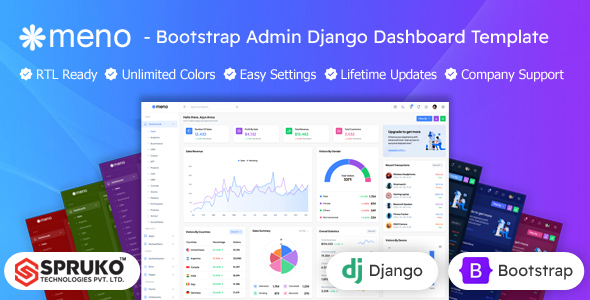
Meno is a static Bootstrap admin dashboard template for Django projects, providing 16 dashboard layouts and 180+ HTML pages. It serves as a robust UI foundation for agencies and freelancers building Python-backed admin panels, saving significant front-end development time.
Meno: A Static UI Kit for Django Admin Dashboards
From a developer's perspective, Meno is essentially a comprehensive collection of pre-built HTML, CSS, and JavaScript files, designed to give you a head start on a Django admin dashboard template. It's important to understand this isn't a full Django application with pre-wired backend logic. Instead, it’s a well-structured front-end kit that you integrate into your existing Django project.
This approach means you get a ready-made user interface that you then connect to your Django views and models. It’s built on Bootstrap, which is a solid, familiar framework for most web developers, ensuring a consistent base and making customization relatively straightforward if you know your way around CSS and Sass.
Who Benefits from This Bootstrap Admin Panel (And Who Doesn't)
This Bootstrap admin panel is particularly useful for agencies and freelancers who need to deliver visually appealing admin interfaces quickly. If your workflow involves taking static designs and integrating them into a Python backend, Meno can shave off considerable hours from your front-end development. It's also a good fit for in-house teams looking for a consistent, pre-designed starting point for internal tools or data visualization dashboards.
However, Meno is not for everyone. If you're a beginner expecting a plug-and-play solution that handles all your Django backend needs, this isn't it. You'll need a solid grasp of Django templating, static file management, and some JavaScript to get this fully operational. It's also less ideal for projects requiring a highly unique, non-Bootstrap UI from scratch, as adapting it extensively might take more effort than building a custom solution.
Exploring Meno's UI Components and Dashboard Variations
Meno comes packed with a lot of UI. You get over 180 HTML pages, which cover most common admin panel needs like user profiles, settings, authentication pages, and various form layouts. The standout feature here is the 16 distinct dashboard variations, offering different layouts and data presentations for specific niches.
- Sales Dashboard
- Analytics Dashboard
- Ecommerce Dashboard
- CRM Dashboard
- HRM Dashboard
- NFT Dashboard
- Crypto Dashboard
- Jobs Dashboard
- Projects Dashboard
- Courses Dashboard
- Stocks Dashboard
- Medical Dashboard
- POS system Dashboard
- Podcast Dashboard
- School Dashboard
- Social media Dashboard
This variety means you can often find a dashboard that's close to what you need for a specific project, saving you the initial design and layout work. The template also supports various layout configurations like vertical, horizontal, and RTL, which is standard but appreciated for flexibility in global projects.
Under the Hood: Code Structure and Developer Experience with Meno
One of the first things we look for in a template like this is how well it's put together. Meno is built with Bootstrap and Sass, and importantly, it's advertised as having no jQuery dependency. This is a big plus in modern web development, as it generally leads to lighter, faster-loading assets and fewer potential conflicts. For a business owner, this translates to better website performance and lower long-term maintenance costs.
The inclusion of SCSS files means you can customize the theme's colors, typography, and component styles efficiently using Sass variables, rather than digging through compiled CSS. In our experience with similar frameworks, well-organized SCSS significantly speeds up branding and UI adjustments. The code is also noted as "well-commented" and "W3C Validated," which are good indicators of a template that aims for decent quality and semantic accessibility, benefiting search engine optimization and overall site health.
Device Responsiveness and Browser Support
Like any modern web template, Meno is responsive, meaning it adapts its layout to look good on desktops, tablets, and smartphones. This is a basic expectation these days, but it's crucial for ensuring a consistent user experience across all devices. For a business owner, this means your admin panel will be accessible and usable whether your team is on the go or at their desk, preventing productivity bottlenecks.
Cross-browser compatibility is also covered, which is standard practice but still important. It ensures the interface behaves predictably for all users, regardless of their preferred browser, avoiding frustrating bugs or display issues.
Technical SEO Foundations
The description mentions an "SEO-Friendly Architecture" with clean code and structured data. While a static admin template doesn't directly handle SEO for your public-facing site, a well-structured HTML foundation with semantic tags contributes to a technically sound base. This helps search engines understand the content hierarchy, which is beneficial if parts of your admin panel are indexed or if you're building a content-rich internal tool.
Final Take: Is Meno a Smart Investment for Your Django Project?
Meno offers a solid starting point for anyone building a Django admin dashboard template, especially if you prioritize front-end speed and a Bootstrap-based UI. It solves the problem of starting from a blank slate, providing a wealth of pre-designed pages and components that you can quickly integrate and adapt. The lack of jQuery is a definite advantage for performance and maintainability.
The main trade-off is that it’s a static UI kit, not a full-stack Django solution. You'll need to handle the integration with your Django views, URLs, and forms yourself. However, for developers who are comfortable with this workflow and appreciate a well-organized front-end base, Meno is a smart investment. It significantly cuts down on initial UI development time, letting you focus more on the Python backend logic that drives your application.
FAQ
Is Meno a complete Django application?No, Meno is a static HTML, CSS, and JavaScript UI kit. You will need to integrate it with your existing Django project's backend logic and templating system.
What level of technical expertise is needed to use this template?You should have a good understanding of Django, Bootstrap, HTML, CSS (especially Sass), and JavaScript to effectively integrate and customize Meno for your project.
Can I easily change the overall look and feel?Yes, because it uses Sass and Bootstrap, you can modify global variables to quickly change colors, fonts, and other stylistic elements across the entire template.
Does this template impact website performance?Meno is built without jQuery and uses modern JavaScript, which generally leads to better performance and faster loading times compared to older, jQuery-heavy templates.