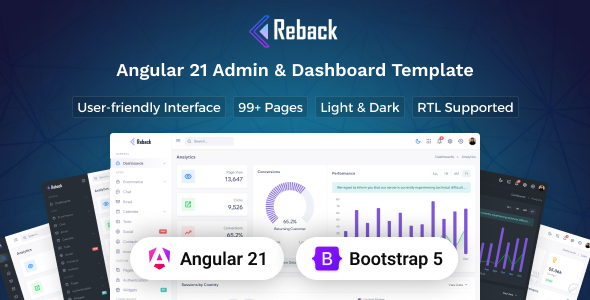
Reback is an Angular admin dashboard template built with Bootstrap, offering a comprehensive UI kit for custom backend interfaces. It suits developers and agencies needing a rapid start for client-side admin portals or internal tools.
Reback: An Angular Admin Dashboard Template for Rapid Development
Reback positions itself as a premium UI kit for building admin dashboards using Angular and Bootstrap. From a practical standpoint, this means you get a pre-designed and pre-coded frontend for your administrative interfaces. It’s essentially a head start on the visual and interactive elements of a backend system, saving you from building common UI components from scratch.
This template provides a significant chunk of the frontend work, allowing developers to focus on integrating their specific business logic and connecting to their APIs. It’s about accelerating the development process for an Angular admin dashboard template rather than starting from a blank canvas.
Who Reback Helps and Who Should Look Elsewhere
This Angular admin dashboard template is a solid fit for development agencies and freelance developers tasked with building custom admin panels or internal tools for clients. If you need to deliver a polished, responsive user interface quickly, Reback provides a robust foundation. It's particularly useful for projects where the client requires a modern look and feel without a massive budget for custom UI design.
However, Reback is not for everyone. If you're not already comfortable with Angular, or if your project primarily involves a simple brochure website, this might be overkill. It's a UI kit, meaning it handles the frontend presentation; it doesn't come with pre-built backend logic or database connections. You'll need to integrate your own server-side code and APIs.
Analyzing Reback's Design and Layout Options
Reback offers a clean, modern design with both light and dark versions, which is a standard expectation for admin dashboards today. The inclusion of five distinct layout types, like a small sidebar or a hover sidebar, provides good flexibility for different user preferences or content density needs. This variety helps in tailoring the user experience without deep CSS overrides.
The design philosophy seems to prioritize clarity and functionality, which is essential for an admin interface where users need to process information efficiently. While not groundbreaking, it’s a solid, predictable aesthetic that works well for business applications where an internal tool development workflow is key.
Reback's Extensive Collection of Pages and UI Components
What you get here is a substantial collection of pre-built elements. With over 85 pages and 400 UI components, Reback covers most common admin panel needs. This includes everything from basic typography and buttons to more complex elements like forms, tables, charts, and various Bootstrap UI components.
The "ready-to-use apps" like Calendar, Chat, Mailbox, and eCommerce are essentially UI shells. They provide the frontend structure and design for these functionalities, but you'll still need to hook them up to your actual data and backend services. This is a common approach in UI kits and a practical way to offer comprehensive design without dictating backend choices.
- Dashboard pages give you a starting point for displaying key metrics.
- Form elements and validation are well-covered, which saves a lot of time on data input screens.
- Charts Library integration is crucial for data visualization in admin tools.
- Error pages and authentication pages (login, register) are ready to be wired into your system.
Developer Experience and Code Structure in Reback
The template is built with Angular and Bootstrap, which are well-understood frameworks in the web development community. The mention of "extensive use of SCSS variables" is a good sign; it means rebranding and theme adjustments should be relatively straightforward. Instead of digging through hundreds of lines of CSS, you can adjust a few variables to change colors, fonts, and spacing, which significantly reduces maintenance costs for clients down the line.
In our experience with similar frameworks, this kind of SASS architecture makes it much easier to maintain a consistent look across a large application. The code is documented, which is always a plus for team collaboration and onboarding new developers. While the input doesn't detail the Angular component structure, a well-organized Angular project should allow for easy component reuse and separation of concerns.
Ensuring Reback Works Across Devices and Browsers
Reback is fully responsive, meaning it adapts well to different screen sizes, from desktops to mobile devices. This is non-negotiable for any modern web application, especially admin panels where users might need to access information on the go. The Bootstrap foundation ensures this responsiveness is handled competently out of the box.
Browser compatibility is also addressed, covering major browsers like Chrome, Firefox, Safari, and Edge. This helps ensure a consistent user experience regardless of the browser your internal users or clients prefer, reducing the number of cross-browser bug fixes developers typically face.
Technical SEO Considerations for Reback-based Admin Panels
For an admin dashboard, traditional public-facing SEO is less of a concern since these panels are typically behind authentication. However, the underlying code quality still matters for performance and maintainability. A clean semantic structure, as implied by a well-built Bootstrap and Angular project, contributes to a good foundation.
While not directly impacting search rankings for a public site, a well-structured HTML and efficient asset loading (which an Angular app should aim for) will lead to faster load times and a smoother experience for internal users. This indirectly benefits the business by improving user productivity and reducing frustration, aligning with good Core Web Vitals practices for any web application.
Is Reback the Right Angular Admin UI Kit for Your Project?
If you're an Angular developer or an agency regularly building custom admin interfaces, Reback offers a substantial head start. It genuinely solves the problem of spending countless hours on repetitive UI tasks, allowing you to focus on the unique business logic of your application. The comprehensive set of components and layouts means you’ll likely find what you need without extensive custom development for common elements.
While it’s a UI kit and requires your own backend integration, the time saved on frontend development makes it a smart investment. It's a practical, no-nonsense tool for getting a robust and good-looking Bootstrap admin UI kit up and running efficiently, especially for those seeking ready-to-use Angular components for internal tools.
FAQ
Is Reback a complete application with a backend?No, Reback is an Angular admin dashboard template, which means it provides the frontend user interface and components. You will need to integrate your own backend logic and APIs.
How easy is it to customize Reback's appearance to match my brand?Reback uses SCSS variables extensively, making it relatively straightforward to change colors, fonts, and other visual styles. This allows for efficient rebranding without deep CSS overrides.
Does Reback support different languages or right-to-left (RTL) layouts?Yes, Reback includes support for both LTR (left-to-right) and RTL (right-to-left) layouts, which is useful for internationalization requirements.
What level of Angular knowledge is required to use Reback effectively?To get the most out of Reback, a solid understanding of Angular framework concepts, component architecture, and data binding is essential, as it's a native Angular project.