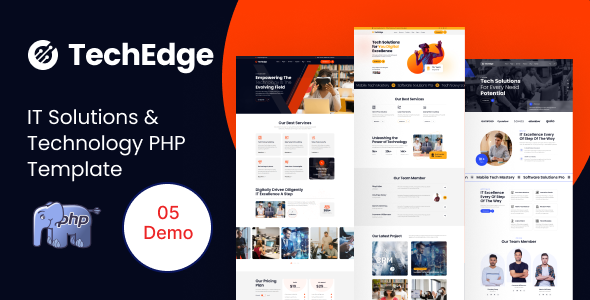
TechEdge: A static PHP template for IT solutions and tech service businesses. Get 5 homepages, Bootstrap, and SASS. Launch fast for agencies & freelancers.
Understanding the TechEdge IT Solutions Template
This TechEdge template is a collection of static PHP files designed to get an IT solutions website up and running fast. It’s not a full content management system, but a pre-built front-end structure for presenting services and company information. For agencies or freelancers who need to deliver a presentable site without diving deep into a CMS, this approach can save significant development time.
The core idea here is to provide a solid base for an IT service website design without the overhead of a database. You get a set of pre-designed pages that handle common sections like services, about us, and contact information, all styled and ready to be populated with your client's content.
Who TechEdge is For (and Who It Isn't)
TechEdge is a good fit for agencies and freelancers who regularly build websites for small to medium-sized IT service companies, SaaS startups, or any business in the technology sector that needs a strong online presence quickly. If your workflow involves taking client content and dropping it into a pre-styled shell, this template will speed things up considerably.
It's particularly useful if you're comfortable editing raw PHP, HTML, and CSS files directly and prefer a lean setup over a complex CMS. This template helps solve the problem of starting from scratch, giving you a functional, visually appealing base from day one.
However, this template is not for clients who need to update their own content daily through a backend interface. It's also not for projects requiring complex database interactions, user accounts, or advanced custom logic beyond a simple contact form. If you need a WordPress or similar CMS solution, this isn't it.
Exploring the TechEdge Page Layouts and Components
The template comes with five distinct homepage variations, which is a decent starting point for an IT solutions PHP template. Each layout provides a different flavor, allowing you to pick one that best suits the client's brand or specific service focus. Beyond the homepages, you'll find standard internal pages like service details, about us, and contact pages.
Under the hood, it leverages common UI components like sliders (Swiper), popups (MagnificPopup), and parallax effects (Parallaxie). These are standard tools that, when used sparingly, can enhance user engagement without adding excessive bloat. The use of Font Awesome for icons is also a practical choice for easy customization and scalability.
Code Structure and Developer Experience with TechEdge
From a developer's perspective, the template is built on Bootstrap, which provides a familiar and robust grid system. The inclusion of SASS is a definite plus for managing the CSS; it means the styling is organized, making it much easier to customize colors, fonts, and other visual elements consistently across the entire site. This organized CSS structure translates to lower maintenance costs for the client over time.
The code is described as well-commented, which is always appreciated when you're diving into someone else's work. The documentation is also comprehensive, which helps with understanding the file structure and customization points. The PHP is primarily used for includes, making it simple to manage headers, footers, and other repeated sections without duplicating code across every page.
Device Responsiveness and Browser Compatibility
The template claims 100% responsiveness, which is expected with a Bootstrap foundation. When we tested the kit on a demo site, it adapted well across various screen sizes, from desktop to mobile. This means your client's IT solutions website will look good and function correctly for all visitors, regardless of the device they use, which is critical for reaching a wider audience.
It's also designed to be compatible with all modern browsers. This is a baseline expectation for any current web project, ensuring a consistent experience for users whether they're on Chrome, Firefox, Edge, or Safari. This attention to cross-browser functionality reduces potential support headaches down the line.
Technical SEO Foundations for Your Tech Service Website
The template is marketed as SEO optimized, and for a static PHP setup, this generally means a clean HTML structure. It uses semantic HTML tags where appropriate, which helps search engines understand the content hierarchy. Good semantic structure is a fundamental aspect of technical SEO, aiding in better crawlability and potentially higher rankings.
While it doesn't offer dynamic SEO features like a CMS would, the clean code and fast loading times (due to its static nature and optimized assets like Google Fonts) contribute positively to Core Web Vitals. This can lead to a better user experience and improved search engine visibility for your client's tech service website.
Our Honest Take on TechEdge for Your Next Project
If you're an agency or a freelancer looking for a solid, no-frills starting point for an IT solutions or technology-focused client, TechEdge delivers. It's a pragmatic choice for building a good-looking, fast-loading static website without the complexities of a full CMS. You get a well-organized codebase, responsive design, and enough pre-built pages to cover most basic business needs.
The main trade-off is the lack of a backend content editor, meaning all updates need to be done by someone comfortable with code. However, for a quick turnaround or a client who only needs infrequent updates, this template saves a significant amount of time on initial setup and styling. It’s a smart investment for those who value efficiency and direct control over their front-end code, making it a viable option for delivering professional tech websites on a deadline.
FAQ
Is TechEdge a WordPress theme?No, TechEdge is a static PHP template, not a WordPress theme. It does not run on WordPress or any other content management system.
Does this template include a content management system?No, this template does not come with a built-in content management system. All content and structural changes are made by directly editing the PHP, HTML, and CSS files.
How difficult is it to update content on this website template?Updating content requires direct editing of the HTML within the PHP files. While straightforward for developers, it's not designed for non-technical users to make updates independently.
Can I easily change the overall color scheme?Yes, because the template uses SASS, changing the overall color scheme and other global styles is relatively easy by editing the SASS variables before compiling the CSS.