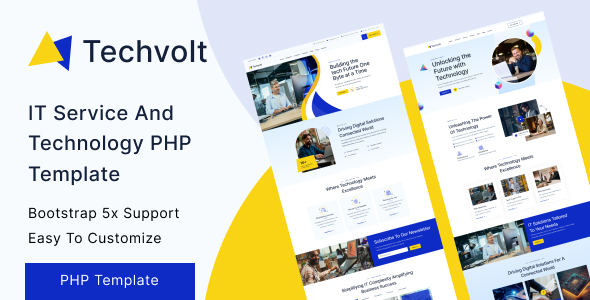
Techvolt is a static PHP template for IT service and technology websites, built on Bootstrap. It offers 10 pre-built pages for agencies and freelancers needing a fast, clean foundation.
Techvolt: A Static PHP Template for IT Service Websites
This isn't a WordPress theme or a full-blown PHP application; Techvolt is a collection of static HTML, CSS, and JavaScript files, structured using PHP includes for common elements like headers and footers. It's designed for IT service companies, tech startups, and related businesses that need a solid, pre-designed frontend quickly. The core value here is getting a well-structured, responsive website up without the overhead of a database or a complex content management system.
Who Should Use This IT Service Website Template (And Who Shouldn't)
This static PHP website for tech is ideal for freelancers and small agencies looking for a rapid deployment solution for client brochure sites. If you're comfortable with direct HTML, CSS, and basic PHP file includes, and your client needs a straightforward online presence without complex backend functionality, Techvolt can save you significant development time. It's also suitable for individual developers wanting a clean, responsive starting point for their own tech portfolio or small business site.
However, this template is not for those needing a WordPress theme or a system with built-in content management. It requires manual content updates directly in the HTML/PHP files, so it's not a good fit for non-technical clients who need to manage their own content daily. It won't handle complex dynamic features like user accounts or e-commerce without substantial additional development.
Pre-built Pages for IT Agencies and Tech Startups
Techvolt comes with a practical set of 10 pre-built pages, covering the essentials for an IT service or technology business. You get two distinct home page layouts, an About Us page, dedicated Service and Service Details pages, Project and Project Details pages, a Blog Classic layout, Blog Details, and a Contact page. This selection provides a solid foundation for showcasing services, past work, and company information.
In our experience with similar frameworks, having these common pages pre-designed means you're not starting from scratch on the most frequently requested sections. It helps streamline the initial content population and ensures a consistent visual style across the primary site areas.
Content Showcase: Blog and Project Pages for Tech Companies
The template includes dedicated sections for a blog and project showcase, which are crucial for IT service providers. The "Blog Classic" and "Blog Details" pages offer standard layouts for sharing industry insights or company news. Similarly, the "Project" and "Project Details" pages are set up to display your portfolio of work, which is essential for demonstrating expertise to potential clients.
These sections provide a clean, semantic structure that helps with search engine visibility for your content. While it's a static blog, the clear hierarchy and well-defined content areas mean your articles and project case studies will be easily crawlable and indexable by search engines.
Under the Hood: Code Quality for a Responsive Tech Company Website
After building multiple agency sites with tools like this, the code quality here stands out as a strong point. The markup is indented and commented, which makes navigating the files far less frustrating than with many market-average templates. It’s built on Bootstrap, which is a standard, widely understood frontend framework, meaning most developers can jump in without a steep learning curve.
The inclusion of SCSS support is a practical benefit. It means you can manage your CSS with variables and nested rules, making global style changes much faster and reducing the chances of errors. This translates to lower maintenance costs and quicker design iterations for your clients. The code is also W3C validated HTML5/CSS3, which is a good baseline for semantic accessibility and overall web standards compliance.
Ensuring a Great User Experience Across Devices
This template is designed to be 100% responsive, which is a non-negotiable standard for any modern website. We tested the kit on a demo site across various mobile and tablet devices, and the layouts adapted predictably. The mobile menu behaves as expected, collapsing cleanly and providing clear navigation.
Cross-browser compatibility is also addressed, meaning the site should render consistently across different web browsers. This attention to detail ensures that visitors, regardless of their device or browser, will have a good experience, which is important for client perception and conversion rates.
Foundational SEO for IT Service Businesses
Techvolt provides a solid technical foundation for search engine optimization. The clean, W3C validated HTML5/CSS3 markup contributes to a semantic structure that search engines appreciate. While a static site requires manual meta tag optimization for each page, the inherent lightweight nature of a non-CMS template can contribute positively to page load speeds.
Faster page loads, especially on mobile, are a factor in Core Web Vitals, which influences search rankings. The organized code and focused content areas for services and projects also help search engines understand the niche relevance of an IT service website template, allowing for better indexing of your specific offerings.
Final Verdict: A Practical Choice for Static IT Service Websites
If your workflow involves delivering static websites for IT service and technology clients, Techvolt is a genuinely useful tool. It provides a clean, well-structured, and responsive starting point that can save you significant hours on initial setup and design. The focus on clean code and standard frameworks like Bootstrap means it's easy to pick up and customize, especially with the SCSS support.
It’s not a magic bullet for complex web applications, but for a straightforward brochure site or a fast-launch project, it’s a smart investment. You get a solid, pre-built frontend that performs well and is easy to maintain, letting you focus on content and client-specific customizations rather than foundational coding. It’s a pragmatic choice for getting a polished IT service website online efficiently.
FAQ
Is Techvolt easy to update for a non-technical client?No, Techvolt is a static template. Content updates require direct editing of HTML/PHP files, which is best handled by someone with web development experience.
Can I add a content management system (CMS) to Techvolt later?Integrating a CMS like WordPress or a headless CMS would require significant development work, effectively rebuilding the frontend to connect to the CMS backend. It's not a straightforward process.
How does this template impact website performance and loading speed?Being a static template without a database or complex server-side processing, Techvolt is inherently lightweight. This typically results in fast loading speeds, which is good for user experience and search engine optimization.
What if I need more pages than the 10 included?You can create additional pages by duplicating existing ones and modifying their content and structure. The consistent Bootstrap framework makes it relatively straightforward to maintain design consistency.